I found ssdv.exe for Windows
To get a picture:
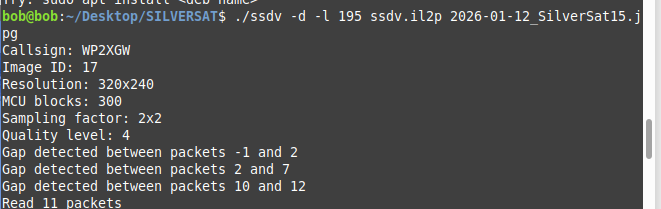
ssdv -d -l 195 1.bin output.jpg
Voila

FILES.zip (67.4 KB)
I found ssdv.exe for Windows
To get a picture:
ssdv -d -l 195 1.bin output.jpg
Voila
FILES.zip (67.4 KB)
i will share the script..
That is awesome! Do you mind if I post that to the SilverSat social media sites?
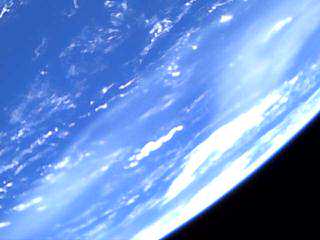
I managed to get this image from only 17 frames I received successfully before the end of the broadcast. Many thanks to Vlad and Scott!
just go a head
Thanks! I’m trying to follow the thread above: was this picture a composite of frames from multiple stations?
no . this from single station. i decode from satnogs obs from this station . not my station. very good station
For those interested in merging multiple bin files to create a single image, Phil Heron (SSDV author) has kindly provided a python utility.
https://mega.nz/file/zsEHyLqI#PyWgmHgtVjDmPhWNX8tYPHJEkLg1KPbWyVRHNSH1xOY
Good hunting all,
Bob
N6RFM
Thanks Bob!
I foolishly thought that I could replace the ‘256’ length value in this script to work w/ ‘195’ for SilverSat, but something else needs to be changed as well.
Only changing the length value, you get:
Perhaps:
# First two bytes are assumed
packet = b"Uf" + packet[2:]

try:
    parts = struct.unpack(">2BIBH4BH205sI32s", packet)
except struct.error:
    return None

keys = [
    "sync", "type", "callsign", "image_id", "packet_id",
    "width", "height", "flags", "mcu_offset", "mcu_index",
    "payload", "checksum", "fec"
]
parts = dict(zip(keys, parts))
… needs to be adjusted for the structure of the packets from SilverSat? Don’t know; I only copy/paste and don’t know python.
Can anyone help with what needs to be changed in these ASRTU-1 scripts to make them work w/ SilverSat? Thanks!
based on above information, i trying create the script. this script support multiple image, from multiple station, and from multiple sender, and auto decode bin to jpeg
silver.py.txt (7.8 KB)
direwolf.conf.txt (67 Bytes)
readme.txt (426 Bytes)
How to:
download all file above. rename silver.py.txt to silver.py and direwolf.conf.txt to direwolf.conf
chmod 755 silver.py
to make the script executable
Troubleshoot:
if direwolf cannot hear your output speaker, you should config the pavucontrol. You only need to set up this once.
open terminal run:
sudo apt install pavucontrol
pavucontrol
look at Recording tab, you will see direwolf app there, please change capture to MONITOR mode both of them. and then you can close the app.
thanks for all people in this thread!
Thank you Scott.
I see, you just fed ssdv my provided hex file.
Never thought it would be so simple!
I’ve afterwards also tried the kss file, but with only 34 packets processed.
So, my way is now to let
ssdv to do the last magic.Very good!
If I go through your file as well as the decodes from EU1SAT and manually copy/paste any frames (in order) that only one of you have into a new file, SSDV then is able to render a more complete image. However, I stopped after a couple dozen frames just to prove the concept. I’ve emailed the author of the ASRTU-1 ‘combine’ script that Bob shared to see if he would have time to create one for the 195-byte frames from SilverSat. I just updated the references to ‘256’ in his script to ‘195’, but something more is required. If I get a reply from him, I’ll post the new script so that multiple HEX decode files can be combined!
Here is my short copy/paste test - clearly some of the missing parts are now complete.
Hello! I’m Tom Conrad, I (along with our students!) developed the radio code for Silversat.
I’m really happy to see the interest in SSDV mode. We added that in the last two months of the project (along with the entire IL2P layer), so it’s gratifying to see it in use!
We have some documentation over on our systems wiki: SSDV · silver-sat/systems Wiki if it’s of any help, but you all seem to be well on your way.
In order to get to a proof-of-concept we focused on making it work with an SDR (I used a Pluto, but now I’m using an RTL-SDR) or using an Amateur radio with a NinoTNC.
I borrowed and adapted some of the IL2P code from Direwolf’s implementation, but I also had to make some compromises in the implementation along the way (we were close to handing the satellite off) in order to fit it in with our existing code. Most of the details of our implementation are on the wiki, and (I think) they’re mostly up to date.
I’ve also created a couple of gnuradio companion flows that are available here: silver-sat/silversat_packets (caveat: the real-time flows haven’t been tested). Silversat_packets is the system I put together to help me manage data at home. I’ve yet to capture anything other than locally generated signals, but I hope to soon!
I’m use a 3-part process. Capture, Processing, and SSDV image recovery. The capture flow is “rtlsdr_iq_capture.grc”. I’m just grabbing a 45 kHz swath of bandwidth and digitizing it.
The processing flow is “passdata_playback.grc”. I do the doppler correction using a block provided by Doug (K8DP), with some modification to work with my database.
The processing block demodulates the signal and converts to bits. The framing bytes are 0x33, 0x55, 0x33, 0x55, followed by a length byte. The IL2P packet follows.
If you want to use a gnuradio companion flow, I wrote an embedded python block, “il2p_rs_and_descramble_crc” which handles il2p decoding (separating fields, doing RS decoding and error correction, descrambling, and checking the overall CRC). It writes that all out to a file that the SSDV executable can decode. (Direwolf does all the same, but I’m not nearly as familiar with it 
If there’s anything you want to know about the system, I’d be happy to answer. I know the team is busy scheduling more photo and SSDV sessions, so there’s more to come!
Tom Conrad (KC3VTJ), Radio Team Mentor, Silversat
I got an amazingly fast reply from Phil, the author of the SSDV utility.
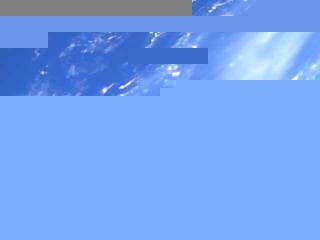
Skipping to the end, here is that same chopped up, partial image after combining the captures from EU1SAT & DL7NDR:
… quite a difference, huh?
So here is the sequence when you have multiple HEX decodes:

… and then use SSDV as usual on the resulting -new- combined .BIN file:
… in the same folder, you should then be able to view the resulting JPG file!!
I’ll attach the ‘ssdv-merge.py’ script here (remove the -v2.TXT extension).
(updated)
ssdv-merge.py-v2.txt (2.9 KB)
I tried to run the exe file but it didn’t work where did you find the program?
N6RFM_SIlversat_SSDV_2026_01_15_T22-31-00Z.hex.txt (10.8 KB)
Here’s my latest attempt from EM12 (North Texas). The SSDV started at about 29 degs elevation as the bird headed over my horizon. Maybe someone can use the hex file (remove .txt). Looks like it may be the same photo as above.Nice to get at least part of the shot!
Good hunting all,
Bob
N6RFM (/5)
Great job, Bob!! I didn’t have the SNR on tonight’s pass do decode but one packet. Thankfully, it was one that Bob did not have!
If anyone downloaded Phil’s script to merge multiple HEX decodes to send the combined binary file to SSDV, please go back up & re-download the updated ‘v2’ version. Phil kindly corrected one bug. I’ll attach it here as well.
ssdv-merge.py-v2.txt (2.9 KB)
We downloaded the current pic at the SilverSat ground station this evening. This is the first complete SSDV we’ve received at our station, and we were able to receive two successive copies during the pass. We’re sending the next week’s schedule up to the satellite over the weekend. I’ll post it here when its uploaded.