2025-11-01 12:59 UTC - Indonesia

4 Likes
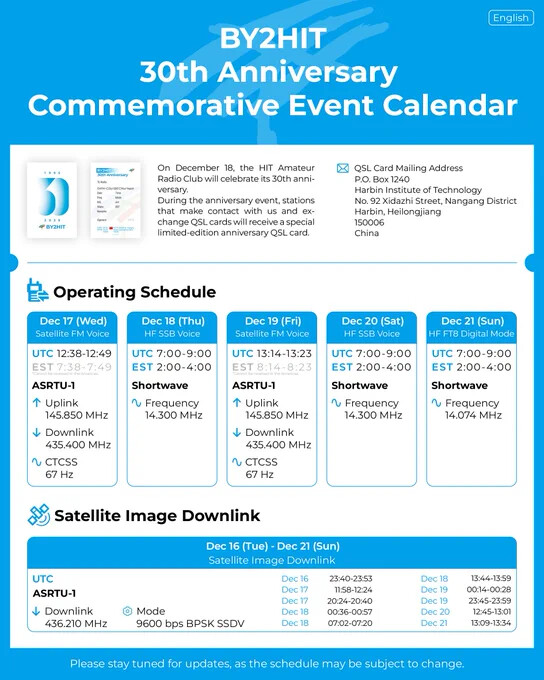
Looks like its only transmitting over China/Asia
Dec 18 07:02 - 07:20 is a 43° pass for me.
3 Likes
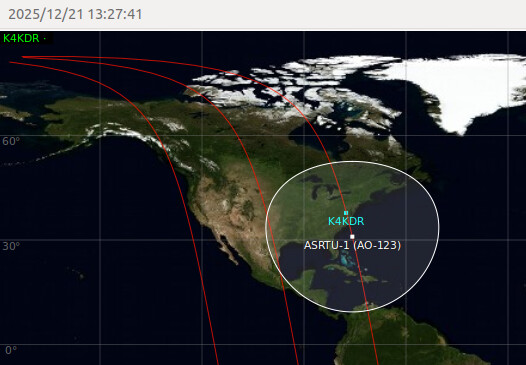
One 62 degree pass will go over my location in Laos. But I have a problem! Is there a Windows OS decoder for this SSDV format? I downloaded the Direwolf SSDV package, but it throws an error ‘the app can’t continue…’
The image decoder circulated for this satellite actually IS a Windows app (but thankfully runs fine on linux via wine).
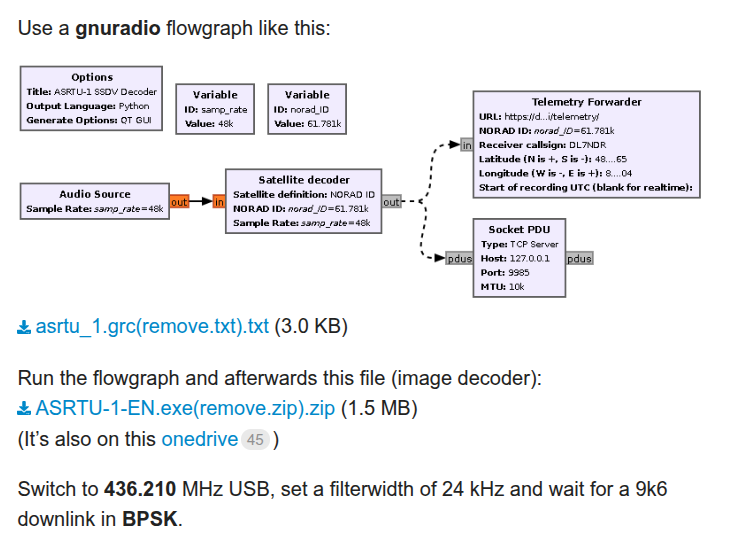
It’s fed via a TCP connection from GNU Radio - explanation & download links are in this post:
@K4KDR, thanks very much! Despite receiving/processing satellite signals for many years, I have always used standalone Windows applications, and never used gnuradio 
But I really need to get to grips with this. I have downloaded/installed the radioconda application, which seems to be the way to go for Windows systems. But how do I run gnuradio from radio conda (there just seems to be a command line window), and how do I run the SSDV application?
Since this satellite will pass over me in a few days from now, is there a gnuradio file that I can run or install that will configure my software ready to decode/process the SSDV signal?
Otherwise, if it’s going to take longer for me to become familiar with radioconda, gnuradio and SSDV, how should I record the received signal for future processing? - as baseband audio or as baseband I/Q? Thanks!
GNU Radio flowgraphs are saved as xxx.grc files.
At the link I provided is an image of what the very minimum possible flowgraph looks like + a link to download it. (as indicated, remove the tail of the filename to just leave “asrtu_1.grc”)
A couple of lines down from that is another download URL to the Windows .EXE file to run the image decoder. (same deal… remove the tail of the filename to leave “ASRTU-1-EN.exe”)
Because of differences on GNU Radio versions, if you get a “missing block” error when opening that GRC file, don’t worry - it’s a 30-second fix to make that right. Post if you run into that for how to replace that w/ a valid block.
Please don’t be intimated by GNU Radio… it’s just like taking the cover off of a real radio. Signal comes in… filters & other components “do things” to the signal… audio (or some other result) is output. Traces on a circuit board are replaced by lines connecting the blocks and various ‘input’ (source) & ‘output’ (sink) blocks take the place of jacks on the front or back of the radio. That’s it!
1 Like
Although I have installed radioconda and gnuradio (correctly I think), I get an error message when I try to run the gnu radio companion app:
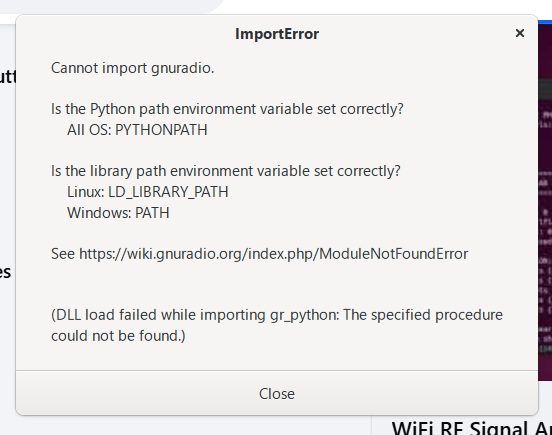
What path/variable do I use when I create the PYTHONPATH environment variable?
.. and the same for the PATH environment variable?
(I have downloaded/installed the latest Python for Windows)
What’s the output of the command set on command line?

It never gets that far when I run GNU Radio Companion…
If I receive the signal (tomorrow), can someone with a working system decode/process the image for me?
What format should I save th received signal in? Baseband I/Q?
1 Like
I/Q is always best, yes. An audio recording depends on the right mode, bandwidth, & doppler tracking. With an I/Q recording, you have the entire spectrum to replay as you wish.
1 Like
I’ll use my SDR++ and gpredict doppler tracking to record a good file (if I see the signal!) Thanks
1 Like
Just enter set on command line, free from GNU Radio.
Sorry - I misunderstood!
This is the cmd result to SET:
C:\Users\User>set
ACSvcPort=17532
ALLUSERSPROFILE=C:\ProgramData
APPDATA=C:\Users\User\AppData\Roaming
CommonProgramFiles=C:\Program Files\Common Files
CommonProgramFiles(x86)=C:\Program Files (x86)\Common Files
CommonProgramW6432=C:\Program Files\Common Files
COMPUTERNAME=LAPTOP-Q7KKIPJ2
ComSpec=C:\WINDOWS\system32\cmd.exe
DriverData=C:\Windows\System32\Drivers\DriverData
EFC_11936_1592913036=1
HOMEDRIVE=C:
HOMEPATH=\Users\User
LOCALAPPDATA=C:\Users\User\AppData\Local
LOGONSERVER=\LAPTOP-Q7KKIPJ2
NUMBER_OF_PROCESSORS=12
OneDrive=C:\Users\User\OneDrive
OS=Windows_NT
Path=C:\Program Files\Common Files\Oracle\Java\javapath;C:\Program Files (x86)\Common Files\Oracle\Java\java8path;C:\Program Files (x86)\Common Files\Oracle\Java\javapath;C:\WINDOWS\system32;C:\WINDOWS;C:\WINDOWS\System32\Wbem;C:\WINDOWS\System32\WindowsPowerShell\v1.0;C:\WINDOWS\System32\OpenSSH;C:\Program Files (x86)\NVIDIA Corporation\PhysX\Common;C:\Program Files\NVIDIA Corporation\NVIDIA NvDLISR;C:\Program Files\dotnet;D:\JTDX\bin;C:\Program Files\PuTTY;“%PY_HOME%;%PY_HOME%\Lib;%PY_HOME%\DLLs;%PY_HOME%\Lib\lib-tk;”;C:\Users\User\AppData\Local\Microsoft\WindowsApps;D:\SatDump\bin
PATHEXT=.COM;.EXE;.BAT;.CMD;.VBS;.VBE;.JS;.JSE;.WSF;.WSH;.MSC
PROCESSOR_ARCHITECTURE=AMD64
PROCESSOR_IDENTIFIER=AMD64 Family 25 Model 68 Stepping 1, AuthenticAMD
PROCESSOR_LEVEL=25
PROCESSOR_REVISION=4401
ProgramData=C:\ProgramData
ProgramFiles=C:\Program Files
ProgramFiles(x86)=C:\Program Files (x86)
ProgramW6432=C:\Program Files
PROMPT=$P$G
PSModulePath=C:\Program Files\WindowsPowerShell\Modules;C:\WINDOWS\system32\WindowsPowerShell\v1.0\Modules
PUBLIC=C:\Users\Public
PYTHONPATH=C:\Users\User\AppData\Roaming\Microsoft\Windows\Start Menu\Programs\radioconda\GNU Radio Companion.lnk;%PY_HOME%;%PY_HOME%\Lib;%PY_HOME%\DLLs;%PY_HOME%\Lib\lib-tk;
RlsSvcPort=22112
SESSIONNAME=Console
SystemDrive=C:
SystemRoot=C:\WINDOWS
TEMP=C:\Users\User\AppData\Local\Temp
TMP=C:\Users\User\AppData\Local\Temp
USERDOMAIN=LAPTOP-Q7KKIPJ2
USERDOMAIN_ROAMINGPROFILE=LAPTOP-Q7KKIPJ2
USERNAME=User
USERPROFILE=C:\Users\User
windir=C:\WINDOWS
PYTHONPATH= uses %PY_HOME% but I don’t see it defined.
Check that with the command echo %PY_HOME%.
If it just returns %PY_HOME%, then you have to set the variable PY_HOME with set PY_HOME=C:\.... (wherever python is installed on your machine).
Thanks. PY_HOME was not set. Is it OK to add the shortcut filepath for Python in the set command? I did this, but still get the same error message
By set PY_HOME=C:\.... you already did it.
If the same message keeps appearing, the problem should lie elsewhere.
I’m on linux, so my options to help you on Windows are almost exhausted.