Update Juni 5, 2026:
the latest version of satnogs-client docker have a working code (thank you @sdoukos ) that have same function with this add on. if you install satnogs with manual docker instalalation like in this tutorial, you can update your docker client with this command:
cd ~/station-4451
sudo docker-compose pull
caution: if you enable iq dump, please read this post
So if the same function is already handled by satnogs-client official, is this add-on script still useful? Yes ofc, you can still use it for other satellites besides HADES-SA, or need custom freq offset and bandwidth. And it’s not limited to only one satellites. look at USB_NORAD variable that can handle more than one sat.
i make an addon for satnogs, so you can decode the ssdv image from HADES-SA with just replay the .ogg audio, running soundmodem and your favourite decoder script.
this tutorial running on raspberry with satnogs manual docker installation
STEP BY STEP
change directory to your ground station directory:
cd ~/station-4365
create app directory(If it already exists, skip this step)
mkdir app
edit docker-compose.yml
nano docker-compose.yml
Look at the line that contains:
    volumes:
      - type: 'tmpfs'
        target: '/tmp'
Then copy and paste the following text right below it:
      - type: 'bind'
        source: './app'
        target: '/app'
edit station.env:
nano station.env
find the following variable and change its value to: (if it doesn’t exist yet, add it)
SATNOGS_PRE_OBSERVATION_SCRIPT=/app/satnogs-pre {{ID}} {{FREQ}} {{TLE}} {{TIMESTAMP}} {{BAUD}} {{SCRIPT_NAME}}

SATNOGS_POST_OBSERVATION_SCRIPT=/app/satnogs-post {{ID}} {{FREQ}} {{TLE}} {{TIMESTAMP}} {{BAUD}} {{SCRIPT_NAME}}

# IQ RAW
ENABLE_IQ_DUMP=true
IQ_DUMP_RENAME=false
IQ_DUMP_FILENAME=/tmp/.satnogs/iq.raw

# USB2OGG
USB_ENABLE=true
USB_FREQ_OFFSET=-900
USB_BANDWIDTH=2600
USB_NORAD=68446
look at this HADES-SA waterfall …
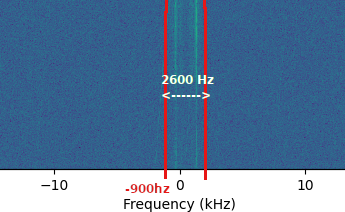
you can custom the value for this variable, based on that waterfall:
USB_FREQ_OFFSET
the start point. because it is on the left of zero, it is negative.. default -900 hz
USB_BANDWIDTH
default 2600 hz
USB_NORAD
default: 68446 hades-sa norad id, add another norad id that you want record audio as USB here separated by space, example:
USB_NORAD=68446 40931 62715 61224
go to app dir:
cd app
copy paste and run this command (download the usb2ogg add on script):
git clone https://github.com/hobisatelit/usb2ogg
make it executable
cd usb2ogg/
chmod 755 sox usb2ogg.py usb2ogg.sh
create satnogs-pre script (If it already exists, just edit and add the new line) (if you running satnogs before version 2.1.2 you can ignore this step):
before observation begin, all command in this script will be executed. we put command to delete all raw file from last obs to make sure the space clean for new obs.
cd ~/station-4365/app
nano satnogs-pre
copy paste this
#!/bin/bash
echo ""
echo "======================= START OBS ${1} ======================="

echo "DELETE ${IQ_DUMP_FILENAME}*"
rm -rfv "${IQ_DUMP_FILENAME}"*
make it executable:
chmod 755 satnogs-pre
create satnogs-post script (If it already exists, just edit and add the new line):
cd ~/station-4365/app
nano satnogs-post
copy paste this
#!/bin/bash
/app/usb2ogg/usb2ogg.sh stop "$@" &

echo "======================= END OBS ${1} ======================="
echo ""
if you have another script that called from satnogs-post, please make sure to put usb2ogg.sh at first line / top, to make sure this script runs before other scripts, so execution completes before the next observation starts
make it executable:
chmod 755 satnogs-post
restart station:
cd ~/station-4365
sudo docker-compose down && sudo docker-compose up -d && sudo docker-compose logs -f
and.. finish! 
NOW create new observations for HADES-SA
to validate if this add is work, open the observation page, look at audio download
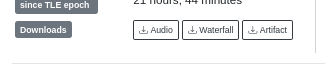
click on Audio, and if you see the filename satnogs_xxxxxx_MOD.ogg, , that indicate it work! congratz!
now open the audio tab, replay, and open your fave modem + decoder
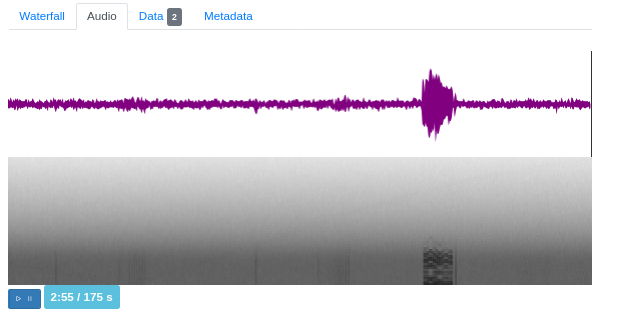
73!
good luck!