SDRplay and Client Version 2.1.1

Hi All.

I’m trying to bring Station 1920 back to life and it’s not as easy as it use to be it seems.
I have all the software installed as per the instructions and it seems to test out fine BUT will not upload anything and now I’m stuck and confused as to why that is.

Any help appreciated.

https://network.satnogs.org/observations/13362497/

pi@Satnogs1920:/ $ SoapySDRUtil --probe = “driver = sdrplay”
######################################################

Soapy SDR – the SDR abstraction library

######################################################

Probe device
[INFO] devIdx: 0
[INFO] SerNo: 1702026B00
[INFO] hwVer: 2
[INFO] rspDuoMode: 0
[INFO] tuner: 1
[INFO] rspDuoSampleFreq: 0.000000


– Device identification

driver=SDRplay
hardware=RSP2
sdrplay_api_api_version=3.150000
sdrplay_api_hw_version=2


– Peripheral summary

Channels: 1 Rx, 0 Tx
Timestamps: NO
Other Settings:
* RF Gain Select - RF Gain Select
[key=rfgain_sel, default=4, type=string, options=(0, 1, 2, 3, 4, 5, 6, 7, 8)]
* IQ Correction - IQ Correction Control
[key=iqcorr_ctrl, default=true, type=bool]
* AGC Setpoint - AGC Setpoint (dBfs)
[key=agc_setpoint, default=-30, type=int, range=[-60, 0]]
* ExtRef Enable - External Reference Control
[key=extref_ctrl, default=true, type=bool]
* BiasT Enable - BiasT Control
[key=biasT_ctrl, default=true, type=bool]
* RfNotch Enable - RF Notch Filter Control
[key=rfnotch_ctrl, default=true, type=bool]


– RX Channel 0

Full-duplex: NO
Supports AGC: YES
Stream formats: CS16, CF32
Native format: CS16 [full-scale=32767]
Antennas: Antenna A, Antenna B, Hi-Z
Corrections: DC removal
Full gain range: [0, 47] dB
IFGR gain range: [20, 59] dB
RFGR gain range: [0, 8] dB
Full freq range: [0.001, 2000] MHz
RF freq range: [0.001, 2000] MHz
CORR freq range: MHz
Sample rates: 0.0625, 0.096, 0.125, 0.192, 0.25, 0.384, 0.5, 0.768, 1, [2, 10.66] MSps
Filter bandwidths: 0.2, 0.3, 0.6, 1.536, 5, 6, 7, 8 MHz

Generating support report. Please wait…
------------[ copy here ]------------
{
“versions”: {
“satnogs-client”: “unknown”,
“satnogs-ansible”: “unknown”,
“satnogs-flowgraphs”: “unknown”,
“gr-satnogs”: “unknown”,
“gr-soapy”: “unknown”,
“gnuradio”: “unknown”,
“satnogs-config”: “1.1”
},
“state”: {
“is-applied”: false,
“pending-tags”: null
},
“system”: {
“date”: “2026-02-08T21:11:04.230327+00:00”,
“platform”: {
“system”: “Linux”,
“node”: “satnogs-config”,
“release”: “6.12.62+rpt-rpi-v8”,
“version”: “#1 SMP PREEMPT Debian 1:6.12.62-1+rpt1 (2025-12-18)”,
“machine”: “aarch64”,
“processor”: “”
},
“memory”: {
“total”: 949989376,
“available”: 610394112,
“percent”: 35.7,
“used”: 273747968,
“free”: 192184320,
“active”: 265641984,
“inactive”: 370343936,
“buffers”: 13611008,
“cached”: 470446080,
“shared”: 3338240,
“slab”: 63463424
},
“disk”: {
“total”: 29960372224,
“used”: 9751023616,
“free”: 18943369216,
“percent”: 34.0
}
},
“configuration”: {
“satnogs_antenna”: “Antenna A”,
“satnogs_api_token”: “[redacted]”,
“satnogs_gain_mode”: “Settings Field”,
“satnogs_other_settings”: “IFGR=27,RFGR=6”,
“satnogs_rf_gain”: “34”,
“satnogs_rx_bandwidth”: “600e3”,
“satnogs_rx_samp_rate”: “2e6”,
“satnogs_soapy_rx_device”: “driver=sdrplay,serial=1702026B00”,
“satnogs_station_elev”: “550”,
“satnogs_station_id”: “1920”,
“satnogs_station_lat”: “54.892”,
“satnogs_station_lon”: “-112.298”
}
}
------------[ copy end ]-------------

Hi, is this your first setup with the RSP as SDR ? I notice your 2024 observations where running an RTL-SDR..

I am assuming this is a normal installation and no docker setup. did you try to omit the serial number for the rsp device settings ?

You should be able to show some log output from observation start which might / should give a clue what’s going wrong.

sudo docker logs -f satnogs-client

Hi. Thanks for the reply.

This is a new install using the Raspberry Pi Image and new 32gb SD Card. I’ve had the RSP-SDR running in the past but it’s been a few years ago now. I just pulled it out of a box and wanted to put it to good use as Station 1920 but it’s proving difficult. I have tried without the Serial Number and it’s still the same results. I find it odd that it seems to go through the motions of creating the files but never posts the results. Where do i look for the created files because their not in the folders it states.

This was a very good pass from back in 2021 using the SDRplay

Thanks
Karl.

Hi Karl,

my bet, there are no files being created. Why not is something I cannot tell from here but I am pretty sure the log files when starting an observation will.

Ben

image

Could you please look at this and tell me why it’s saying there’s a problem on line 104 of the satnogs_fm.py file “File “/usr/bin/satnogs_fm.py”, line 104”

Does it have anything to do with a TypeO of “fc32” and should match this “Stream formats: CS16, CF32”

File “/usr/bin/satnogs_fm.py”, line 104, in init
self.soapy_source_0_0 = soapy.source(dev, “fc32”, 1, dev_args,

pi@Satnogs1920:~ $ sudo docker logs satnogs_satnogs-client
/opt/pipx/venvs/satnogs-client/lib/python3.11/site-packages/apscheduler/init.py:1: UserWarning: pkg_resources is deprecated as an API. See https://setuptools.pypa.io/en/latest/pkg_resources.html . The pkg_resources package is slated for removal as early as 2025-11-30. Refrain from using this package or pin to Setuptools<81.
from pkg_resources import get_distribution, DistributionNotFound
Matplotlib is building the font cache; this may take a moment.
/opt/pipx/venvs/satnogs-client/lib/python3.11/site-packages/matplotlib/projections/init.py:63: UserWarning: Unable to import Axes3D. This may be due to multiple versions of Matplotlib being installed (e.g. as a system package and as a pip package). As a result, the 3D projection is not available.
warnings.warn("Unable to import Axes3D. This may be due to multiple versions of "
rot_init called
initrots4_dummy: _init called
rot_register (1)
rot_register (2)
dummy_rot_init called
rot_open called
dummy_rot_open called
dummy_rot_open: dummy rotator so simulating speed
rot_get_position called
dummy_rot_get_position called
rot_get_position: got az=0.00, el=0.00
rig_check_rig_caps: p1=0x7fa1570640, p2=0x7fa1576bc0, rig_model=0x7fa1570640, macro_name=0x7fa1576bc0
initrigs4_dummy: _init called
rig_init: rig_model=Hamlib NET rigctl
rig_init: rx_range_list1 is empty, using rx_range_list2
rig_init: rig does not have tx_range!!
netrigctl_init version 20230106.0
Traceback (most recent call last):
File “/usr/bin/satnogs_fm.py”, line 485, in
main()
File “/usr/bin/satnogs_fm.py”, line 468, in main
tb = top_block_cls(antenna=options.antenna, bb_freq=options.bb_freq, bw=options.bw, dc_removal=options.dc_removal, decoded_data_file_path=options.decoded_data_file_path, dev_args=options.dev_args, deviation=options.deviation, doppler_correction_per_sec=options.doppler_correction_per_sec, enable_iq_dump=options.enable_iq_dump, file_path=options.file_path, gain=options.gain, gain_mode=options.gain_mode, iq_file_path=options.iq_file_path, lo_offset=options.lo_offset, max_modulation_freq=options.max_modulation_freq, other_settings=options.other_settings, ppm=options.ppm, rigctl_host=options.rigctl_host, rigctl_port=options.rigctl_port, rx_freq=options.rx_freq, samp_rate_rx=options.samp_rate_rx, soapy_rx_device=options.soapy_rx_device, stream_args=options.stream_args, tune_args=options.tune_args, udp_dump_host=options.udp_dump_host, udp_dump_port=options.udp_dump_port, waterfall_file_path=options.waterfall_file_path)
^^^^^^^^^^^^^^^^^^^^^^^^^^^^^^^^^^^^^^^^^^^^^^^^^^^^^^^^^^^^^^^^^^^^^^^^^^^^^^^^^^^^^^^^^^^^^^^^^^^^^^^^^^^^^^^^^^^^^^^^^^^^^^^^^^^^^^^^^^^^^^^^^^^^^^^^^^^^^^^^^^^^^^^^^^^^^^^^^^^^^^^^^^^^^^^^^^^^^^^^^^^^^^^^^^^^^^^^^^^^^^^^^^^^^^^^^^^^^^^^^^^^^^^^^^^^^^^^^^^^^^^^^^^^^^^^^^^^^^^^^^^^^^^^^^^^^^^^^^^^^^^^^^^^^^^^^^^^^^^^^^^^^^^^^^^^^^^^^^^^^^^^^^^^^^^^^^^^^^^^^^^^^^^^^^^^^^^^^^^^^^^^^^^^^^^^^^^^^^^^^^^^^^^^^^^^^^^^^^^^^^^^^^^^^^^^^^^^^^^^^^^^^^^^^^^^^^^^^^^^^^^^^^^^^^^^^^^^^^^^^^^^^^^^^^^^^^^^^^^^^^^^^^^^^^^^^^^^^^^^^^^^^^^^^^^^^^^^^^^^^^^^^^^^^^^^^^^^^^^^^^^^^^^^^^^^^^^^^^^^^^^^^^^^^^^^^^^^^^^^^^^^^^^^^^^^^^^^^^^^^^^^^^^^^^^^^^^^^^^^^^^^^^^^^^^^^^^^^^^^^^^^^^^^^^^^^^^^^^^^^^^^^^^^^^^^^^^^^^^^^^^^^^^^^^^^^^^^^^^^^^^^^^^^^^^^^^^^^^^^^^^^^^^^^^^^^^^^^^^^^^^^^^^^^^^^^^^^^^^^^^^^^^^^^^^^^^^^^^^^^^^^^^^^^^^^^^^^^^^^^^^^^^^^^^^^^^^^^^^^^^^^^^^^^^^^^^^^^^^^^^^^^^^^^^^^^^^^^^^^^^^^^^^^^^^^^^^^^^^^^^^^^^^^^^^^^^^^^^^^
File “/usr/bin/satnogs_fm.py”, line 104, in init
self.soapy_source_0_0 = soapy.source(dev, “fc32”, 1, dev_args,
^^^^^^^^^^^^^^^^^^^^^^^^^^^^^^^^^^^^^^
RuntimeError: SoapySDR::Device::make() no match
netrigctl_close: done
ERROR satnogsclient.observer.observer No waterfall data file found
rig_check_rig_caps: p1=0x7fa83a0640, p2=0x7fa83a6bc0, rig_model=0x7fa83a0640, macro_name=0x7fa83a6bc0
initrigs4_dummy: _init called
rig_init: rig_model=Hamlib NET rigctl
rig_init: rx_range_list1 is empty, using rx_range_list2
rig_init: rig does not have tx_range!!
netrigctl_init version 20230106.0
Traceback (most recent call last):
File “/usr/bin/satnogs_fm.py”, line 485, in
main()
File “/usr/bin/satnogs_fm.py”, line 468, in main
tb = top_block_cls(antenna=options.antenna, bb_freq=options.bb_freq, bw=options.bw, dc_removal=options.dc_removal, decoded_data_file_path=options.decoded_data_file_path, dev_args=options.dev_args, deviation=options.deviation, doppler_correction_per_sec=options.doppler_correction_per_sec, enable_iq_dump=options.enable_iq_dump, file_path=options.file_path, gain=options.gain, gain_mode=options.gain_mode, iq_file_path=options.iq_file_path, lo_offset=options.lo_offset, max_modulation_freq=options.max_modulation_freq, other_settings=options.other_settings, ppm=options.ppm, rigctl_host=options.rigctl_host, rigctl_port=options.rigctl_port, rx_freq=options.rx_freq, samp_rate_rx=options.samp_rate_rx, soapy_rx_device=options.soapy_rx_device, stream_args=options.stream_args, tune_args=options.tune_args, udp_dump_host=options.udp_dump_host, udp_dump_port=options.udp_dump_port, waterfall_file_path=options.waterfall_file_path)
^^^^^^^^^^^^^^^^^^^^^^^^^^^^^^^^^^^^^^^^^^^^^^^^^^^^^^^^^^^^^^^^^^^^^^^^^^^^^^^^^^^^^^^^^^^^^^^^^^^^^^^^^^^^^^^^^^^^^^^^^^^^^^^^^^^^^^^^^^^^^^^^^^^^^^^^^^^^^^^^^^^^^^^^^^^^^^^^^^^^^^^^^^^^^^^^^^^^^^^^^^^^^^^^^^^^^^^^^^^^^^^^^^^^^^^^^^^^^^^^^^^^^^^^^^^^^^^^^^^^^^^^^^^^^^^^^^^^^^^^^^^^^^^^^^^^^^^^^^^^^^^^^^^^^^^^^^^^^^^^^^^^^^^^^^^^^^^^^^^^^^^^^^^^^^^^^^^^^^^^^^^^^^^^^^^^^^^^^^^^^^^^^^^^^^^^^^^^^^^^^^^^^^^^^^^^^^^^^^^^^^^^^^^^^^^^^^^^^^^^^^^^^^^^^^^^^^^^^^^^^^^^^^^^^^^^^^^^^^^^^^^^^^^^^^^^^^^^^^^^^^^^^^^^^^^^^^^^^^^^^^^^^^^^^^^^^^^^^^^^^^^^^^^^^^^^^^^^^^^^^^^^^^^^^^^^^^^^^^^^^^^^^^^^^^^^^^^^^^^^^^^^^^^^^^^^^^^^^^^^^^^^^^^^^^^^^^^^^^^^^^^^^^^^^^^^^^^^^^^^^^^^^^^^^^^^^^^^^^^^^^^^^^^^^^^^^^^^^^^^^^^^^^^^^^^^^^^^^^^^^^^^^^^^^^^^^^^^^^^^^^^^^^^^^^^^^^^^^^^^^^^^^^^^^^^^^^^^^^^^^^^^^^^^^^^^^^^^^^^^^^^^^^^^^^^^^^^^^^^^^^^^^^^^^^^^^^^^^^^^^^^^^^^^^^^^^^^^^^^^^^^^^^^^^^^^^^^^^^^^^^^^^^^^^^^^^^^^^^^^^^^^^^^^^^^^^^^^^^^^
File “/usr/bin/satnogs_fm.py”, line 104, in init
self.soapy_source_0_0 = soapy.source(dev, “fc32”, 1, dev_args,
^^^^^^^^^^^^^^^^^^^^^^^^^^^^^^^^^^^^^^
RuntimeError: SoapySDR::Device::make() no match
netrigctl_close: done
ERROR satnogsclient.observer.observer No waterfall data file found

1 Like

Can you try the following command, this will show if the SDR is available inside the docker container.

docker exec satnogs-client SoapySDRUtil --probe="driver=sdrplay"

You can also open a bash inside the container with the following command to check functions inside it.

docker exec -ti satnogs-client bash

I have a gut feeling that the sdrplay api service isn’t available inside the container.

@Acinonyx can you comment on the sdr api service ?

Jan | PE0SAT

Thanks for the reply and here are the results.

pi@Satnogs1920:~ $ docker exec satnogs-client SoapySDRUtil --probe=“driver=sdrplay”
Error response from daemon: No such container: satnogs-client
pi@Satnogs1920:~ $ docker exec -ti satnogs-client bash
Error response from daemon: No such container: satnogs-client
pi@Satnogs1920:~ $

Sorry the wrong container name use docker container list to get the correct container name.

Jan | PE0SAT

pi@Satnogs1920:~ $ docker container list
CONTAINER ID IMAGE COMMAND CREATED STATUS PORTS NAMES
fe55c9ad8637 librespace/satnogs-client:2.1.1 “satnogs-client” 14 hours ago Up 13 hours satnogs_satnogs-client
e86a91965ac5 librespace/satnogs-config:1.1 “/bin/sh -c 'trap : …” 44 hours ago Up 13 hours ansible_satnogs-config
f2ad79c50a61 librespace/ansible:9.13.0 “/bin/sh -c 'trap : …” 44 hours ago Up 13 hours ansible_ansible
0b784d6de2ca librespace/hamlib:4.5.4 “/docker-entrypoint.…” 44 hours ago Up 13 hours satnogs_rigctld

I think your onto something as it appears to not be found

Indeed, it seem the sdrplay is not available inside the container.

Jan | PE0SAT

Can you give me directions on installing the last version of Satnogs before the Docker ? say 1.8.1 that worked with SDRPlay.

Thanks for the help
Karl.

Maybe pick some ideas from this snippet Manual Installation of SatNOGS station stack (latest development versions, no docker, May 2025) ($4842563) · Snippets · librespacefoundation / SatNOGS / satnogs-docs · GitLab

2 Likes

I’m currently investigating on adding a method to support SDRplay devices (and similar cases) in the latest version of the ground station software. However, since I don’t own an SDRplay device, I can’t test these changes myself.

Could you help me test the updates and provide feedback once I have something that I assume is working?

2 Likes

I would gladly assist in anyway i can. I have both the RSP1 and the RSPDuo.

I appreciate you looking into this for myself and others.

Thanks
Karl.

3 Likes

I have just merged an MR as a first attempt to support SDRplay.

The steps to test it on an already installed station are:

  1. Login to the RPi
  2. Run satnogs-setup
  3. Navigate to AdvancedDevelopment and set the SATNOGS_SETUP_SATNOGS_ANSIBLE_CHECKOUT_REF to master. This steps switches Ansible to follow our development branch.
  4. Exit satnogs-setup
  5. Once the re-configuration is complete, run echo "satnogs_non_free_sdrplay_enabled: true" | sudo tee -a /var/lib/docker-bindmounts/ansible_ansible/etc/ansible/host_vars/ansible/config.yml. This command adds the newly introduced configuration option to enable SDRplay support.
  6. Run satnogs-setup --install
  7. Accept the prompt to apply updates
  8. Configure your station normally
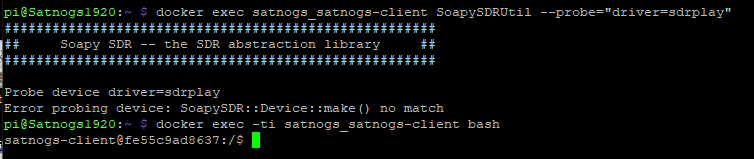
  9. Run sudo docker exec -ti satnogs_satnogs-client SoapySDRUtil --probe="driver=sdrplay"

P.S. The SD card on the RPi must be >=32GiB

1 Like

I will test right away.

image

So this is what i got after the update and check. I’m going to start with a fresh NEW full install from the Rpi Image and i’ll try again.

Thanks and i’ll post back ASAP.

Karl.

2 Likes

Hi.

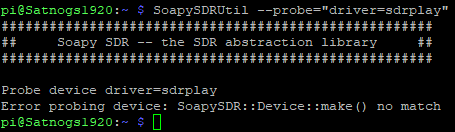
After the install this is all i get.

I then tried installing the SDRplay API. from https://www.sdrplay.com/software/SDRplay_RSP_API-Linux-3.15.2.run But it appears to not be found after the install. I find this strange because in the past it installed just fine and i could –probe it and it would always be there but not this time.

Hope this helps and i’m willing to keep working at it with you.

Thanks
Karl.

Hi.

Below is the output from “satnogs-setup - -install” Also “lsusb” Shows the SDRplay plugged into the USB port but when - - probed it show no match for the “sdrplay” driver.

Hope this helps.

Thanks
Karl.

pi@Satnogs1920:~ $ SoapySDRUtil --find=“driver=sdrplay” ######################################################

Soapy SDR – the SDR abstraction library

######################################################

No devices found! driver=sdrplay
pi@Satnogs1920:~ $ sudo SoapySDRUtil --find
######################################################

Soapy SDR – the SDR abstraction library

######################################################

[INFO] [UHD] linux; GNU C++ version 12.2.0; Boost_107400; UHD_4.3.0.0+ds1-5

RtApiPulse::DeviceInfo pa_context_connect() failed: Connection refused

RtApiAlsa::getDeviceInfo: snd_pcm_open error for device (default), No such file or directory.

RtApiAlsa::getDeviceInfo: snd_pcm_open error for device (hw:1,0), Unknown error 524.

No devices found!
pi@Satnogs1920:~ $ SoapySDRUtil --probe=“driver=sdrplay”
######################################################

Soapy SDR – the SDR abstraction library

######################################################

Probe device “driver=sdrplay”

RtApiPulse::DeviceInfo pa_context_connect() failed: Connection refused

[INFO] [UHD] linux; GNU C++ version 12.2.0; Boost_107400; UHD_4.3.0.0+ds1-5

RtApiAlsa::getDeviceInfo: snd_pcm_open error for device (default), No such file or directory.

RtApiAlsa::getDeviceInfo: snd_pcm_open error for device (hw:1,0), Unknown error 524.

Error probing device: SoapySDR::Device::make() no driver specified and no enumeration results
pi@Satnogs1920:~ $ echo “satnogs_non_free_sdrplay_enabled: true” | sudo tee -a /var/lib/docker-bindmounts/ansible_ansib le/etc/ansible/host_vars/ansible/config.yml
satnogs_non_free_sdrplay_enabled: true
pi@Satnogs1920:~ $ sudo docker exec -ti satnogs_satnogs-client SoapySDRUtil --probe=“driver=sdrplay”
Error response from daemon: No such container: satnogs_satnogs-client
pi@Satnogs1920:~ $ satnogs-setup --install
Configuring SatNOGS Ansible…

Cloning into ‘/var/lib/docker-bindmounts/ansible_ansible/root/.ansible/pull/ansible’…
remote: Enumerating objects: 118, done.
remote: Counting objects: 100% (118/118), done.
remote: Compressing objects: 100% (77/77), done.
remote: Total 118 (delta 3), reused 88 (delta 2), pack-reused 0 (from 0)
Receiving objects: 100% (118/118), 50.27 KiB | 1.05 MiB/s, done.
Resolving deltas: 100% (3/3), done.
Provisioning SatNOGS station…

PLAY [satnogses] ***************************************************************

TASK [Gathering Facts] *********************************************************
ok: [ansible]

TASK [common : Check Ansible version] ******************************************
ok: [ansible] => {
“changed”: false,
“msg”: “All assertions passed”
}

TASK [common : Check distribution] *********************************************
ok: [ansible] => {
“changed”: false,
“msg”: “All assertions passed”
}

TASK [common : Manage sysctl entries] ******************************************
ok: [ansible] => (item={‘name’: ‘net.core.rmem_default’, ‘value’: ‘26214400’})
ok: [ansible] => (item={‘name’: ‘net.core.rmem_max’, ‘value’: ‘104857600’})
ok: [ansible] => (item={‘name’: ‘net.core.wmem_default’, ‘value’: ‘65536’})
ok: [ansible] => (item={‘name’: ‘net.core.wmem_max’, ‘value’: ‘104857600’})

TASK [common : Update APT cache] ***********************************************
changed: [ansible]

TASK [common : Manage packages for Debian/Ubuntu] ******************************
ok: [ansible] => (item=[‘present’, [{‘name’: ‘acl’, ‘state’: ‘present’}, {‘name’: ‘gnupg’, ‘state’: ‘present’}, {‘name’ : ‘cron’, ‘state’: ‘present’}, {‘name’: ‘rng-tools’, ‘state’: ‘present’}, {‘name’: ‘sudo’, ‘state’: ‘present’}]])

TASK [common : Set attributes of files] ****************************************
ok: [ansible] => (item={‘path’: ‘/var/lib/docker-bindmounts/ansible_ansible/etc/ansible/host_vars/ansible’, ‘state’: ‘d irectory’, ‘mode’: ‘750’, ‘owner’: ‘500’, ‘group’: ‘500’})
ok: [ansible] => (item={‘path’: ‘/var/lib/docker-bindmounts/ansible_ansible/root/.ansible/pull’, ‘state’: ‘directory’})
ok: [ansible] => (item={‘path’: ‘/var/lib/docker-bindmounts/satnogs_satnogs-client/opt/satnogs-non-free’, ‘state’: ‘dir ectory’, ‘mode’: ‘755’})

TASK [common : Add cron jobs] **************************************************
ok: [ansible] => (item={‘name’: ‘docker-container-prune’, ‘hour’: ‘4’, ‘minute’: ‘0’, ‘job’: ‘/usr/bin/docker container prune -f >/dev/null’, ‘user’: ‘root’})
ok: [ansible] => (item={‘name’: ‘docker-image-prune’, ‘hour’: ‘4’, ‘minute’: ‘10’, ‘job’: ‘/usr/bin/docker image prune -a -f >/dev/null’, ‘user’: ‘root’})
ok: [ansible] => (item={‘name’: ‘docker-volume-prune’, ‘hour’: ‘4’, ‘minute’: ‘20’, ‘job’: ‘/usr/bin/docker volume prun e -f >/dev/null’, ‘user’: ‘root’})
ok: [ansible] => (item={‘name’: ‘docker-network-prune’, ‘hour’: ‘4’, ‘minute’: ‘30’, ‘job’: ‘/usr/bin/docker network pr une -f >/dev/null’, ‘user’: ‘root’})

TASK [common : Gather service facts] *******************************************
ok: [ansible]

TASK [common : Check if old zram init script exists] ***************************
ok: [ansible]

TASK [common : Install zram-tools] *********************************************
ok: [ansible]

TASK [common : Configure ZRAM compression algorithm] ***************************
ok: [ansible]

TASK [common : Configure ZRAM 50% RAM usage] ***********************************
ok: [ansible]

TASK [satnogs_cleanup : Remove systemd services] *******************************
ok: [ansible] => (item=/etc/systemd/system/rigctld.service)
ok: [ansible] => (item=/etc/systemd/system/rotctld.service)
ok: [ansible] => (item=/etc/systemd/system/satnogs-client.service)

TASK [satnogs_cleanup : Remove SatNOGS Client tmpfs mount] *********************
ok: [ansible]

TASK [satnogs_cleanup : Remove third-party repositories repositories] **********
ok: [ansible] => (item=deb Index of /debian jessie-backports main)

TASK [satnogs_cleanup : Find old SatNOGS repositories] *************************
ok: [ansible]

TASK [satnogs_cleanup : Remove APT pins and configurations] ********************
ok: [ansible] => (item=/etc/apt/preferences.d/satnogs)
ok: [ansible] => (item=/etc/apt/apt.conf.d/01allow-releaseinfo-changes)

TASK [satnogs_cleanup : Uninstall SatNOGS packages] ****************************
ok: [ansible]

TASK [satnogs_cleanup : Remove SatNOGS scripts and directories] ****************
ok: [ansible] => (item=/usr/local/bin/satnogs-upgrade)
ok: [ansible] => (item=/usr/local/share/satnogs-setup)
ok: [ansible] => (item=/var/lib/satnogs-config)
ok: [ansible] => (item=/var/lib/satnogs)

TASK [satnogs_cleanup : Get stats of the SNMP config file] *********************
ok: [ansible]

TASK [satnogs : Add HydraSDR udev rules] ***************************************
ok: [ansible]

TASK [satnogs : Add Airspy udev rules] *****************************************
ok: [ansible]

TASK [satnogs : Add Airspy HF+ udev rules] *************************************
ok: [ansible]

TASK [satnogs : Add M2k udev rules] ********************************************
ok: [ansible]

TASK [satnogs : Add PlutoSDR udev rules] ***************************************
ok: [ansible]

TASK [satnogs : Add HackRF udev rules] *****************************************
ok: [ansible]

TASK [satnogs : Add UHD udev rules] ********************************************
ok: [ansible]

TASK [satnogs : Add LimeSDR udev rules] ****************************************
ok: [ansible]

TASK [satnogs : Add RTL-SDR udev rules] ****************************************
ok: [ansible]

TASK [satnogs : Add SDRplay udev rules] ****************************************
ok: [ansible]

TASK [satnogs : Blacklist SDR modules] *****************************************
ok: [ansible] => (item=rtl2832_sdr)
ok: [ansible] => (item=dvb_usb_rtl28xxu)
ok: [ansible] => (item=rtl2832)
ok: [ansible] => (item=airspy)
ok: [ansible] => (item=hackrf)
ok: [ansible] => (item=msi001)
ok: [ansible] => (item=msi2500)

TASK [satnogs : Check if list of kernel builtin modules exists] ****************
ok: [ansible]

TASK [satnogs : Unload SDR modules] ********************************************
ok: [ansible] => (item=rtl2832_sdr)
ok: [ansible] => (item=dvb_usb_rtl28xxu)
ok: [ansible] => (item=rtl2832)
ok: [ansible] => (item=airspy)
ok: [ansible] => (item=hackrf)
ok: [ansible] => (item=msi001)
ok: [ansible] => (item=msi2500)

TASK [satnogs : Create setup script configuration file] ************************
ok: [ansible]

TASK [satnogs : Copy setup script] *********************************************
ok: [ansible]

TASK [satnogs : Create SatNOGS non-free binary directory] **********************
ok: [ansible]

TASK [satnogs : Copy SatNOGS non-free installer script] ************************
ok: [ansible]

TASK [satnogs : Get install status of non-free software] ***********************
ok: [ansible]

TASK [satnogs : Schedule installation of non-free software] ********************
ok: [ansible]

TASK [docker_engine : Install module dependencies] *****************************
ok: [ansible]

TASK [docker_engine : Remove deprecated Python 3 virtualenv] *******************
ok: [ansible]

TASK [docker_engine : Create Docker image archives directory] ******************
ok: [ansible]

TASK [docker_engine : Find Docker image archives] ******************************
ok: [ansible]

TASK [docker_engine : Manage Docker containers] ********************************
changed: [ansible] => (item=None)
changed: [ansible]

TASK [docker_engine : Start Docker Compose application] ************************
ok: [ansible] => (item=None)
failed: [ansible] (item=None) => {“censored”: “the output has been hidden due to the fact that ‘no_log: true’ was speci fied for this result”, “changed”: true}
fatal: [ansible]: FAILED! => {“censored”: “the output has been hidden due to the fact that ‘no_log: true’ was specified for this result”, “changed”: true}

PLAY RECAP *********************************************************************
ansible : ok=45 changed=2 unreachable=0 failed=1 skipped=22 rescued=0 ignored=0

pi@Satnogs1920:~ $ sudo docker exec -ti satnogs_satnogs-client SoapySDRUtil --probe=“driver=sdrplay”
Error response from daemon: container 940f21ba31bbbf034965174909f3b37b4c3f15605a45caea21770f8f555f07da is not running
pi@Satnogs1920:~ $ lsusb
Bus 001 Device 003: ID 0424:ec00 Microchip Technology, Inc. (formerly SMSC) SMSC9512/9514 Fast Ethernet Adapter
Bus 001 Device 002: ID 0424:9514 Microchip Technology, Inc. (formerly SMSC) SMC9514 Hub
Bus 001 Device 001: ID 1d6b:0002 Linux Foundation 2.0 root hub

pi@Satnogs1920:~ $ lsusb
Bus 001 Device 005: ID 1df7:3010 SDRplay RSP2/RSP2pro
Bus 001 Device 003: ID 0424:ec00 Microchip Technology, Inc. (formerly SMSC) SMSC9512/9514 Fast Ethernet Adapter
Bus 001 Device 002: ID 0424:9514 Microchip Technology, Inc. (formerly SMSC) SMC9514 Hub
Bus 001 Device 001: ID 1d6b:0002 Linux Foundation 2.0 root hub