Thanks so much for posting links to the necessary GRC and other utilities!
Since I only received a modest number of frames w/ sufficient SNR on the 12-Jan-2026 SilverSat pass over the Eastern U.S., my decoded image is not much to look at. But, I’m extremely pleased to participate and be able to show anything at all!

Someone please check for mistakes on my write up of a basic start-to-finish how-to, but these multi-step projects can really be difficult without a list of steps:
-RX SSDV frames from SilverSat; in addition to I/Q recording (in case it’s needed), record AUDIO file from SDR software (suitable for 9k6 baud, so use audio output bandwidth = 15k or greater {in GQRX, 17k is appropriate).

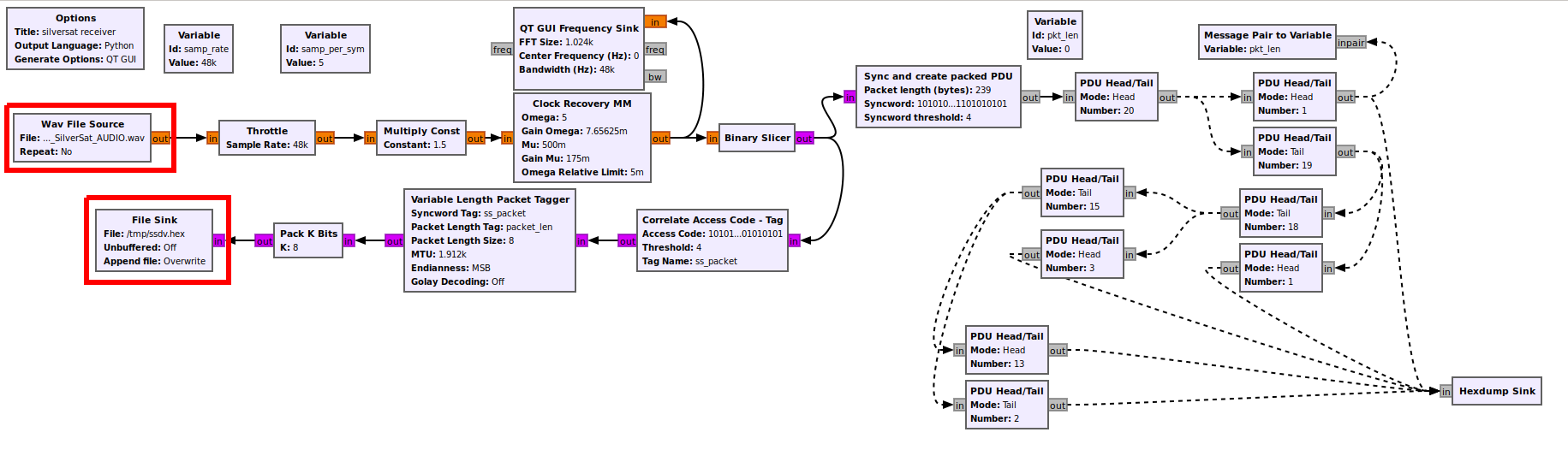
-Download silversat_receive2.grc.zip from https://community.libre.space/uploads/short-url/eiMRpHBpLtPpMuBqIT3tDiTytHp.zip … expand & open in GNU Radio

-set SOURCE as your AUDIO file & confirm location of File Sink for output file ‘ssdv.hex’
-Download il2p_parser.py  from https://raw.githubusercontent.com/silver-sat/Radio_Software/refs/heads/main/gnuradio/il2p_parser.py

-process your ssdv.hex as follows:   python3 il2p_parser.py -i ssdv.hex -o ssdv.il2p   (install any missing python modules as needed)

-Download & compile (per instructions on page) SSDV app from https://github.com/fsphil/ssdv  (i.e., cd~  /  git clone https://github.com/fsphil/ssdv.git   / cd ssdv  / make)

-add ~/ssdv to PATH if you wish

-decode image:   ssdv -d -l 195 ssdv.il2p 2026-01-12_SilverSat.jpg   (use output JPG file name of your choice)

-view JPG image!!!