HADES-SA (SpinnyONE) Transmissions

Well… we know that HADES-SA (SpinnyONE) was launched on the Transporter-16 mission.

Initially, it started transmitting only one SSDV image #224 (It even transmitted an image stored on board. @sv2hwm received this image and posted it HERE).

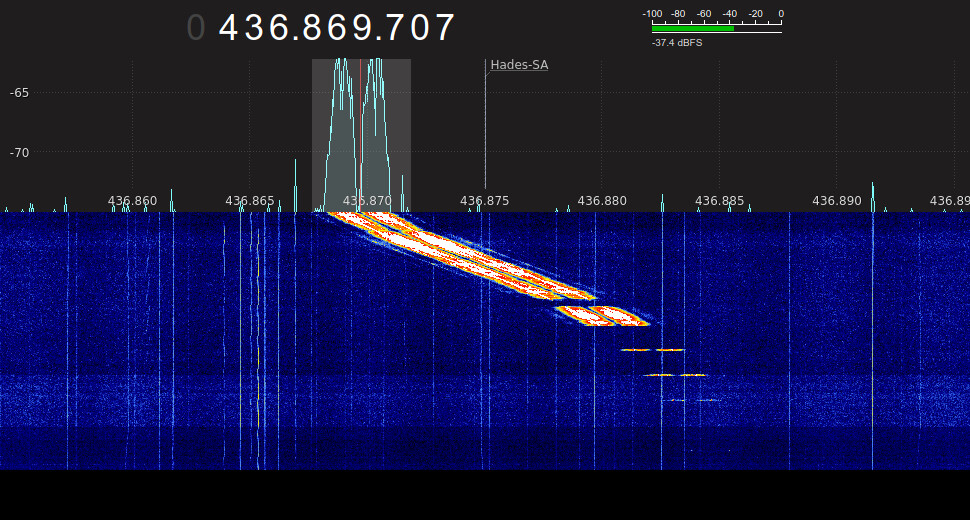
Just a few minutes ago HADES-SA crossed the skies over Brazil :brazil: transmitting the images #214, #215, #216, #217, and #218.


Unfortunately, my reception isn’t great, and it seems the satellite is rotating slightly. Below are my results:

#214:


#215:

#216:

#217:

#218:

I wish everyone lots of luck and lots of fun with this amazing little bird :partying_face: !!

7 Likes

Thanks for opening a separate thread, it’s useful to let the launch one to be more focused on the general overview of the launch.

Just in case someone missed it, there is a new TLE generated.

3 Likes

The IQ FILE from this obs:

Download here

or just audio (.ogg) file:
audio_hades-sa.ogg.zip (1.2 MB)

For decode, download the soundmodem here: (work well with wine32 in linux)

2 Likes

do you record the audio?

1 Like

Do we need to use USB demod for Hades-SA?

Answer - appears to be YES as I replay my recording.

2 Likes

I’ve downloaded all the utilities from the Hades-SA site but am not comprehending what the steps are.

Could someone either spell it out or direct me to where a how-to has already been published. Thanks so much!

Great looking signal, by the way!

1 Like

Use USB to demod

SoundModem + KISSGENESIS can be found HERE

Once you demodulate, 2 files will be generated… The TLM files and the BIN files (Use the BIN files to generate the images and generate the audio CODEC2)

To generate SSDV, use SpinnyONE SSDV utilities… It’s super self-explanatory, just read the readme_ssdv)

To summarize:

  • Take the files sat_03_type_10_ssdv_img_XXX_packet_XXXX.bin generated by KISSGENESIS and copy them to the root folder of SSDV utilities

  • Open the command prompt in the root folder of SSDV utilities and run the command ./run_ssdv.bat xxx (Replace xxx with the ID of the image you received)

  • Congratulations, you have an SSDV image of this beautiful bird :partying_face:

For CODEC2, the process is basically the same. The difference is that you only need to run the run_codec2.bat file from CODEC2 utilities (no action is required via CMD).

Ahh obviously this is the process for Windows machines

6 Likes

IQ file always :grin:

Thanks a million! I did finally figure out that KISSGENESIS.exe had to be running also, so one mystery solved. Now I’ll continue to see what I got.

1 Like

Yep - just moved all these folders to Dropbox so that I access them on the Windows computer. But thanks for mentioning that!

Thanks again for the help!

Looks like 220 is complete; 218 & 219 not as much unless 219 is all white. But as always, feels great to finally be setup for a new downlink!

… whoops! Just noticed there were a small number of files in this downlink for image #'s 221, 222, & 223 as well. Of course you don’t get much w/ only a couple of frames.

4 Likes

If anyone would like to add my .bin files to what they decoded locally for a (hopefully) more complete final image, you’re welcome to them at:

https://www.dropbox.com/scl/fo/49o5yd3aypp2g8zyla0e7/APn_V8Z21u3fDWbmuwAFnXU?rlkey=htnyrrudr9dnh8loj323f22wh&dl=0

2 Likes

Do we know if any upload capability is enabled yet on Hades-SA?

1 Like

can you share the iq file or just audio here. thank you!

1 Like

can you share the iq / audio record ? thanks

Sure thing!

The audio file is so much smaller:

https://www.dropbox.com/scl/fi/6tsrfvuxzfcg7pyx38tzu/usb-demod.wav?rlkey=5tt9xz2tktporsnyqg2whqqnf&dl=0

2 Likes

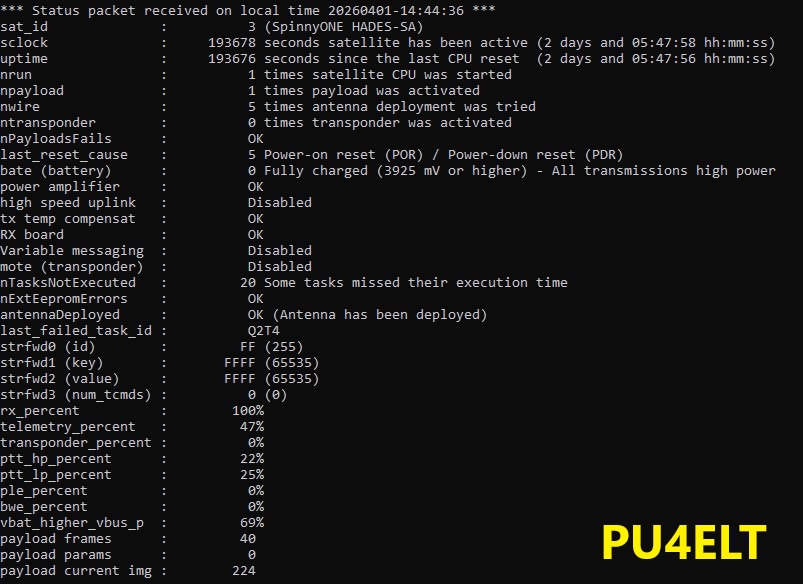
So far, AMSAT-EA has not commented. BTW in one of the telemetry packets we have:

ntransponder: 0
mote: Disable

I received this frame yesterday 2026-04-01 at 14:44UTC

OFC @baliHERE is the excerpt from CODEC2 + SSDV that I received today… Recording from 14:30:50 BRT to 14:35:25 BRT

3 Likes

Got a very nice note from UZ7HO; always great to hear from him.

First, his latest apps for Hades-SA:

http://uz7.ho.ua/genesis800.zip

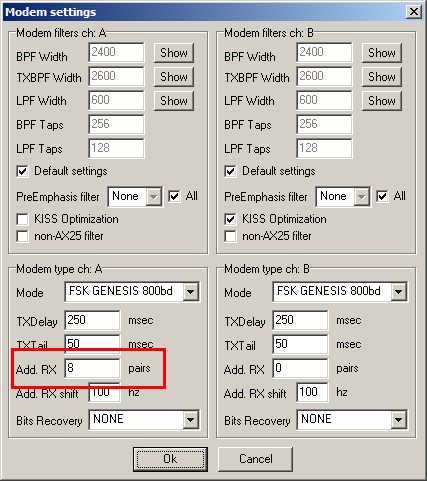
… and a VERY important reminder. Demodulating a USB signal is always tricky because you have to be much more ‘centered’ on the signal than if it was FM. To help with that, SoundModem has a wonderful setting that creates additional decoder pairs to the left & right of dead center - you will often get a LOT more decodes than if you were only decoding a single pair of freqs on the audio spectrum. Here is Andy’s how-to on that:

8 Likes

This is extremely helpful !! Thanks for sharing the tip Scott !!

1 Like

everyone should do this advice. thank you! and can you ask him, i try tx and record the audio using this soundmodem for hades-sa, and try to replay the recording, but it refuse to decode. is it possible to use this modem to decode for non hades ? thank you!