I have been developing a set of bridge scripts to streamline the process of converting SatNOGS waterfall observations into fresh TLEs. This is a current exploration into how we can automate the data hand-off between the tabulation process and the STRF (Satellite Tracking Research Framework) suite.
Below is the workflow I am currently testing.
1. Environment Setup
To maintain consistency during this development phase, ensure you are running within the dedicated virtual environment:
Bash
cd ~/satnogs-waterfall-tabulation-helper
source venv/bin/activate
Note: The script relies on a valid SATNOGS_API_TOKEN in the .env file to successfully pull metadata and reference TLEs for comparison.
2. Tabulation Phase (Data Extraction)
The first script, run_helper.sh, is designed to handle the local fetching of waterfall images and metadata while capturing frequency data points.
Launch: Run ./run_helper.sh [OBSERVATION_ID].
Manual Input: Identify and click the signal path in the GUI.
Output: Upon closing the window, the script parses the points into a .dat format and archives all assets (.json, .png, and TLE) into an organized directory: archives/[Satellite]/[Date]/[ID]/.
3. STRF Bridge (Orbit Analysis)
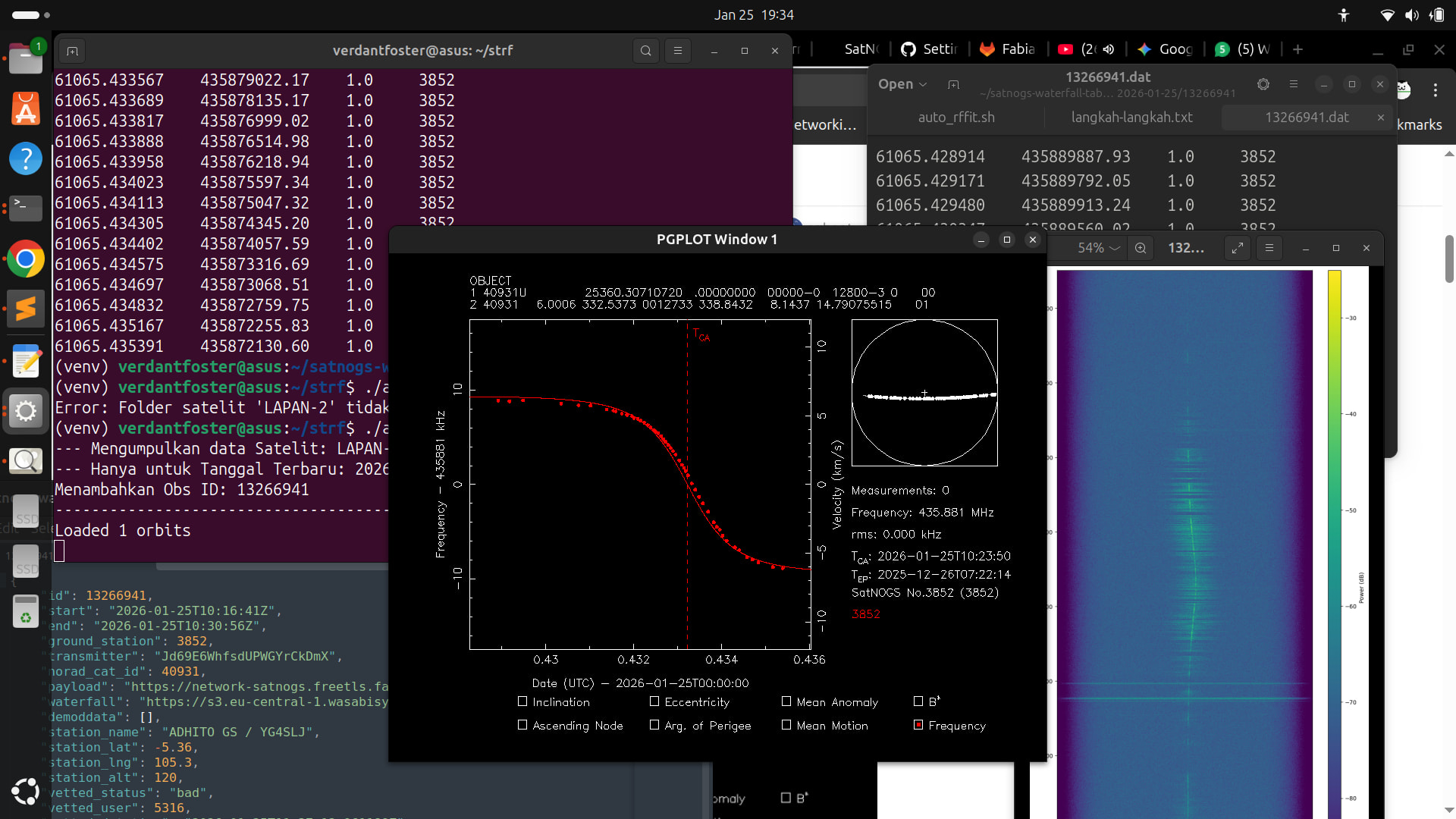
The second part of this workflow involves the auto_rffit.sh bridge script. This is intended to eliminate manual data entry when moving into the analysis phase.
Switch Directory:cd ~/strf
Execute Bridge:./auto_rffit.sh [SATELLITE_NAME]
Station Sync: To ensure calculation accuracy, the script automatically maps your observer coordinates from sites.txt (currently configured for Station ID 3852) to the STRF environment.
4. TLE Refinement & Export
Once the data is passed to rffit, the focus shifts to orbital optimization:
Evaluate Residuals: Observe the deviation between your tabulated points and the reference TLE.
Fitting Loop: Adjust the orbital elements (Inclination, RAAN, etc.) within rffit to minimize the residuals.
Final TLE: Once the curve is optimized, the updated TLE can be exported as a .tle or .txt file for use in tracking software.
#!/bin/bash

# 1. Pastikan argumen adalah angka (ID Observasi)
# Menggunakan regex untuk memastikan hanya angka yang diproses
if [[ ! $1 =~ ^[0-9]+$ ]]; then
    echo "Error: ID Observasi harus berupa angka!"
    echo "Penggunaan: ./run_helper.sh 13266938"
    exit 1
fi

OBS_ID=$1
DATA_ROOT="./data_lokal"

echo "--- Memproses Obs ID: $OBS_ID ---"
python3 satnogs_waterfall_tabulation_helper.py $OBS_ID

sleep 1

JSON_FILE="$DATA_ROOT/observations/${OBS_ID}.json"
if [ -f "$JSON_FILE" ]; then
    SAT_NAME=$(grep -oP '"tle0":\s*"\K[^"]+' "$JSON_FILE" | head -1 | tr -dc '[:alnum:]\-_ ' | tr ' ' '_')
    [ -z "$SAT_NAME" ] && SAT_NAME="Unknown"
else
    SAT_NAME="Unknown"
fi

DATE_STR=$(date +%Y-%m-%d)
TARGET_DIR="archives/${SAT_NAME}/${DATE_STR}/${OBS_ID}"
mkdir -p "$TARGET_DIR"

echo "--- Mengarsipkan ke: $TARGET_DIR ---"

# 3. Pindahkan file dengan mode verbose (-v) agar Anda bisa melihat prosesnya di terminal
mv -v "$DATA_ROOT/waterfalls/${OBS_ID}.png" "$TARGET_DIR/" 2>/dev/null
mv -v "$DATA_ROOT/observations/${OBS_ID}.json" "$TARGET_DIR/" 2>/dev/null
mv -v "$DATA_ROOT/doppler_obs/${OBS_ID}.dat" "$TARGET_DIR/" 2>/dev/null
mv -v "$DATA_ROOT/tles/${OBS_ID}.txt" "$TARGET_DIR/" 2>/dev/null

echo "--------------------------------------------------"
echo "Selesai! Data aman di: $TARGET_DIR"
and here is the script for auto_rffit.sh
#!/bin/bash

# Konfigurasi Path
SATNOGS_DIR="$HOME/satnogs-waterfall-tabulation-helper"
ARCHIVE_ROOT="$SATNOGS_DIR/archives"

# 1. Cek Argumen (Nama Satelit)
if [ -z "$1" ]; then
    echo "Penggunaan: ./auto_rffit.sh [NAMA_SATELIT]"
    echo "Contoh: ./auto_rffit.sh BDSAT-2"
    echo "---------------------------------------"
    echo "Daftar Satelit yang tersedia:"
    ls "$ARCHIVE_ROOT"
    exit 1
fi

SAT_NAME=$1
SAT_PATH="$ARCHIVE_ROOT/$SAT_NAME"

if [ ! -d "$SAT_PATH" ]; then
    echo "Error: Folder satelit '$SAT_NAME' tidak ditemukan."
    exit 1
fi

# 2. Cari Tanggal Paling Terakhir (Terbaru)
# Folder tanggal biasanya berformat YYYY-MM-DD, kita urutkan dan ambil yang terakhir
LATEST_DATE=$(ls -1 "$SAT_PATH" | grep -E '^[0-9]{4}-[0-9]{2}-[0-9]{2}$' | sort -r | head -1)

if [ -z "$LATEST_DATE" ]; then
    echo "Error: Tidak ditemukan folder tanggal di dalam $SAT_PATH"
    exit 1
fi

DATE_PATH="$SAT_PATH/$LATEST_DATE"

# 3. Inisialisasi variabel untuk rffit
DAT_FILES=""
TLE_FILES=""
STATION_ID=""
NORAD_ID=""

echo "--- Mengumpulkan data Satelit: $SAT_NAME ---"
echo "--- Hanya untuk Tanggal Terbaru: $LATEST_DATE ---"

# 4. Loop mencari semua file .dat di folder tanggal terbaru tersebut
while IFS= read -r dat_file; do
    DAT_FILES="$DAT_FILES -d $dat_file"

    BASE_PATH=$(dirname "$dat_file")
    OBS_ID=$(basename "$dat_file" .dat)

    # Ambil file TLE (.txt) jika ada
    if [ -f "$BASE_PATH/$OBS_ID.txt" ]; then
        TLE_FILES="$TLE_FILES -c $BASE_PATH/$OBS_ID.txt"
    fi

    # Ekstraksi Station ID dan NORAD ID dari JSON
    if [ -z "$STATION_ID" ] && [ -f "$BASE_PATH/$OBS_ID.json" ]; then
        STATION_ID=$(grep -oP '"ground_station":\s*\K[0-9]+' "$BASE_PATH/$OBS_ID.json" | head -1)
        NORAD_ID=$(grep -oP '"norad_cat_id":\s*\K[0-9]+' "$BASE_PATH/$OBS_ID.json" | head -1)
    fi

    echo "Menambahkan Obs ID: $OBS_ID"
done < <(find "$DATE_PATH" -name "*.dat")

# 5. Eksekusi rffit
if [ -z "$DAT_FILES" ]; then
    echo "Error: Tidak ada data .dat di tanggal $LATEST_DATE."
    exit 1
fi

echo "------------------------------------------"
# Sinkronisasi sites.txt
cp "$SATNOGS_DIR/data_lokal/sites.txt" ./sites.txt 2>/dev/null

./rffit $DAT_FILES $TLE_FILES -s "$STATION_ID" -i "$NORAD_ID"
Thank you, om Bali. Nice to meet you. I’m also continuing to develop the STRF tool. Yesterday, I was a bit hesitant to push it to Git for some reason, but it’s still okay.
Update: It’s currently in the advanced development stage with 90% full automation. So you can install and uninstall the tool. It will be released very, very soon, and I’ll put it on Git this time.
Thanks for your support, Uncle. Much love and respect from Lampung.

 !
!