Hello everyone.
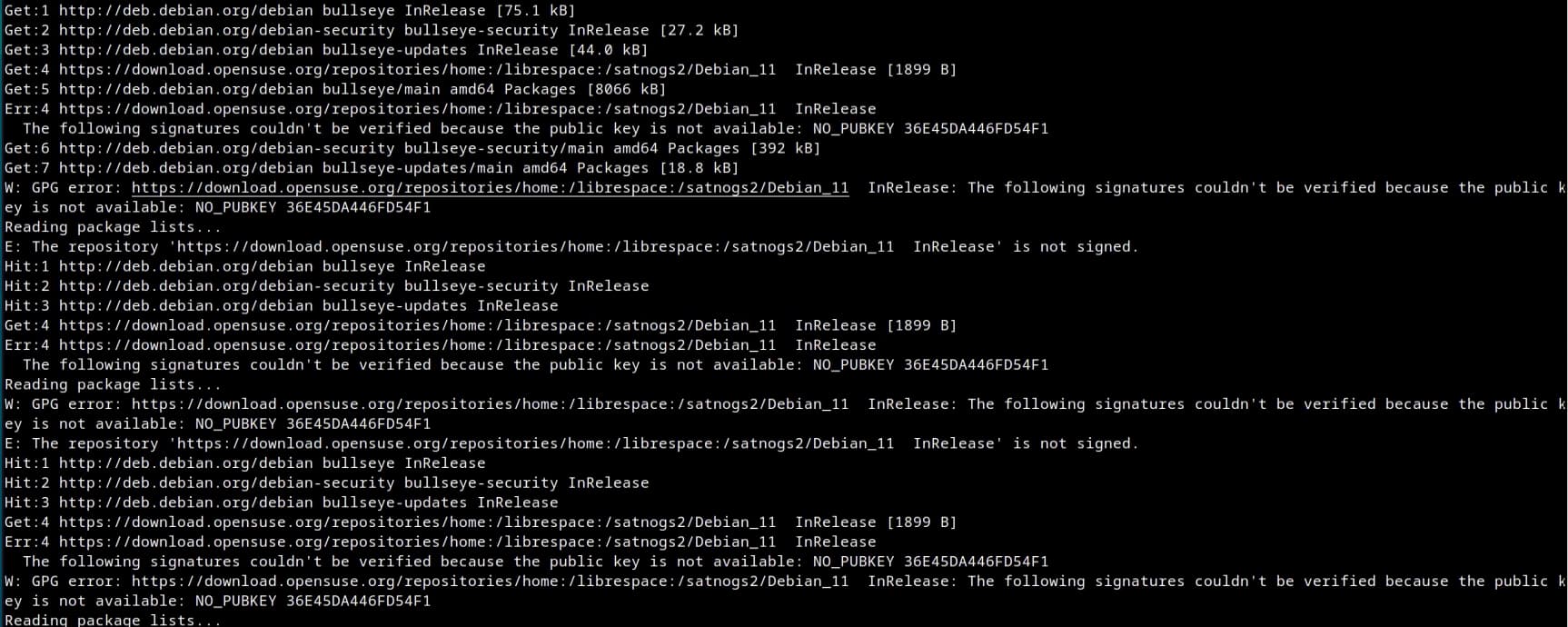
I had a station online and working, when it suddenly disconnected from the network. I tried to reinstall the client, but everything seems fine, and the installation (done through Docker and Ansible) seems to actually work. However, following the troubleshooting guide I found that the satnogs-client container is continuously restarting: from docker ps I see that the STATUS of the container is always Restarting (100) xx seconds ago. The logs of the container are in the image below, and they repeat quite a few times.
It seems that there’s a problem with the key for the repository that is missing, can you confirm that could be the reason why the station got offline? That when the container starts, it tries to install/upgrade packages from that repo, but can’t and then crashes? If that’s the case, how can I fix this?
Hi,
that looks quite peculiar.
what are the exact commands you issued ?
the -client container should not run any apt update.
we’ve had a complete rebuild of the apt archives recently, maybe still some issues with key management.
The process for the installation pulls the satnogs-client image from a private repository (it is stored together with other images used), so any update you make is not automatic. Could that be the problem? We are using version 1.9.3.
Well, it’s a bit of a far reach for support then I guess (;
If you need to run apt update and the repo keys are rejected, you will need to fetch them again fresh from the repos.
In the current image, this is how it’s done on debian 12. On debian 11 it’s this.
If you are using another image, you need to get the repo key to the proper location.