I’ve been enjoying operating SatNOGS for a month now, and a friend recently told me about TinyGS.
I’m curious if anyone here is running both systems. If so, I’d love to hear your thoughts on the differences in your receiving setups and what makes each of them fun or interesting to you.
I currently run stations on both platforms and some differences in at least my receiving setups. On SatNOGS I have non 3d printed antennas and slightly more complex ones like a turnstile with reflectors that somehow works at VHF, UHF and ~1.5445GHz, a helical for L band, a V dipole with reflectors for VHF/UHF and a QFH but these antennas are not super hard to build also for my l band station I use and LNA. TinyGS on the other hand I use a 3D printed self phasing turnstile for UHF a random wire antenna for VHF and a Yagi for 868mhz that is doomed because of cellular interference. TinyGS you can usually get away with almost any antenna but for reasonable performance I would use at the minimum a Ground Plane Antenna. I used a random wire for VHF because i was lazy. I like SatNOGS because there are more satellites I can track and you can decode more of them and even get images if you set up a METEOR satellite decoder. You can also get audio and a waterfall which is cool and nice but SatNOGS is more expensive because the signal needs to be above the noise floor so you need better coax and antennas (atleast in my experience) and SatNOGS does cost more becuase you need a SDR and a Computer (like a PI 3 or a old desktop pc). TinyGS is nice because its cheap in most cases (you only need a ESP32 with a LoRa module on it which is simpler and easier, or get a ESP32 dev and purchase and solder on a separate LoRa module) also TinyGS is nice because its automated and is overall low maintenance meaning its mostly set and forget while you get to see the packets that it received on the website. Also one thing that is nice and is what contributes to using not as good antennas is that it can pull data packets out of the noise floor which is nice. But TinyGS doesn’t let you listen to audio and see a waterfall and you have a more limited choice of satellites and modulations usually only LoRa and sometimes FSK. Again this is just in my experience and if there is and incorrect info please correct me and if there is any missing info you can add onto this.
Thank you so much for the detailed breakdown! It really helps me understand the differences between the two systems.
I’m currently running SatNOGS using an old PC with Debian and an indoor antenna. Do you (or anyone) think I can also join TinyGS with this kind of setup, or would I need a completely separate piece of hardware like an ESP32 board?
Ah, I see! So I’ll need a dedicated little board to play with it, rather than just using my current PC setup. I thought I could jump right in with my existing gear, but it looks like a fun little hardware project to consider!
To just receive and decode in LoRa transmitting satellites (and that’s what TinyGS is mainly used for), you could start with your current setup by just installing a little program.
I honestly thought I needed to buy a separate hardware board, but seeing that I can actually receive and decode LoRa beacons directly with my current RTL-SDR and Linux setup is incredible. Thank you so much for sharing your setup and commands—I’ll definitely look into this!
Just as a quick follow-up, since the manual provided was in German, I had an AI translate and summarize the key points into English. I’ll share them here in case it helps others who might be interested:
What is lorarx? A decoder for LoRa-modulated signals using an RTL-SDR USB stick (supports LoRa APRS, Meshcom, and LoRa WAN).
Key Parameters:
-f <format>: Input data format (e.g., u8, i16, f32).
-i <file>: Input source (IQ-filename or pipe).
-b <bandwidth>: Bandwidth in kHz (0:7.8 to 9:500).
-s <sf>: Spread Factor (5–12; negative for inverted chirps).
-r <Hz>: Exact input sample rate for downsampling.
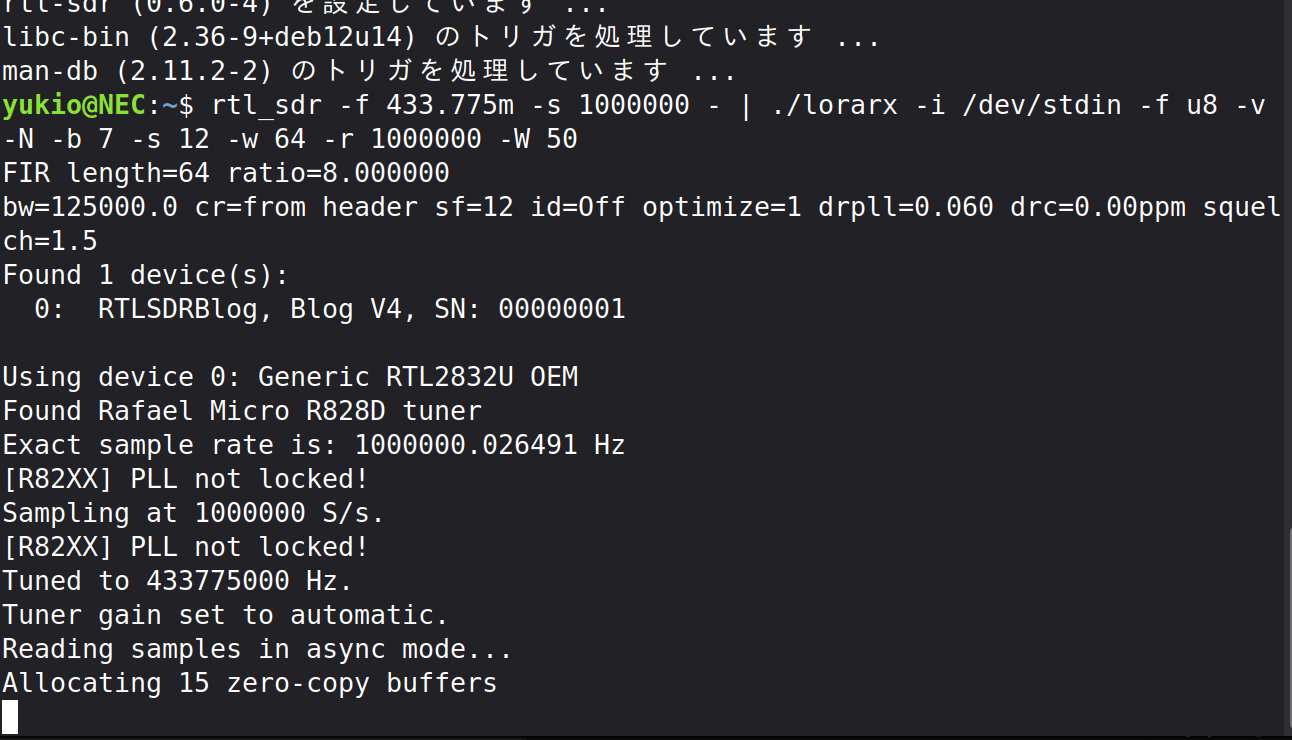
Pipeline Example: Usually combined with rtl_sdr via a pipe, like:
By the way, I have to admit a funny misconception I had earlier:
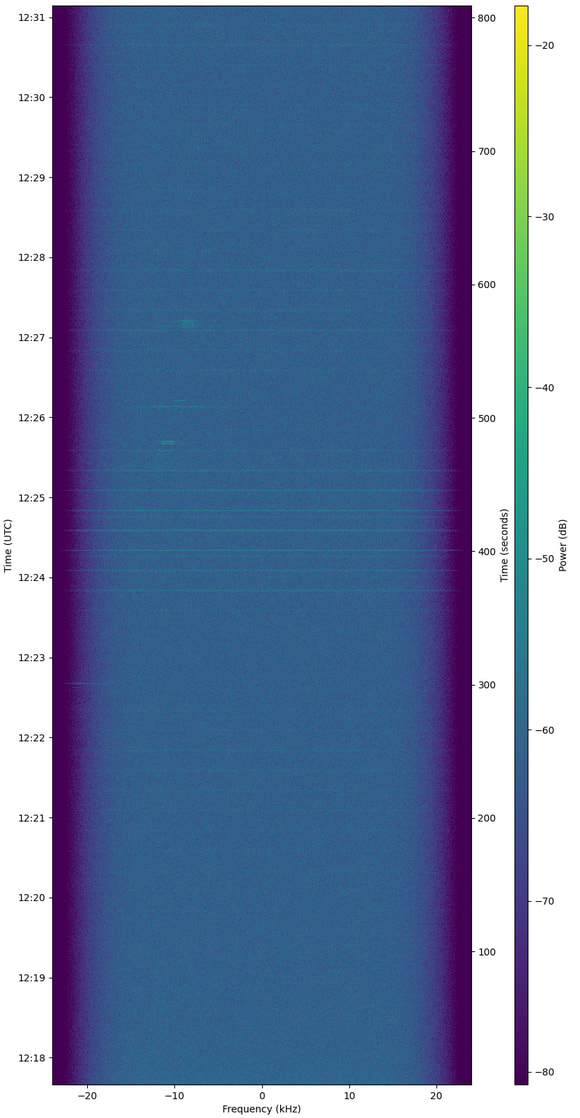
Coming from ground-based LoRa, I naively thought that satellite LoRa would be just as easy to pick up with a simple antenna. But looking at my recent SatNOGS observation results, space LoRa turned out to be quite a tough challenge compared to other common modes!
you;re not wrong. you’re right. in fact , lora sat is easy to pick up. because in nature, the advanced of lora is the signal can still decoded even with weak SNR (negative value). maybe you cant see clear signal on observation waterfall because the bandwidth is too small.
that faint horizontal lines are the lora signals from sat.
the fastest and easiest way is just running lora esp32 board with tinygs firmware. event inside home with just dipole antenna, you still can decode the telemetry. if you put outsite, at least hundred decoded telemetry can you reach, especially on 70cm band.
or just see the signal directly from rtl-sdr + sdr app like sdr++
btw why lora not popular here, because lora is proprietary and not open source, that not in line with libre space manifesto
Most of the LoRa satellites have no up to date TLE in SatNOGS.
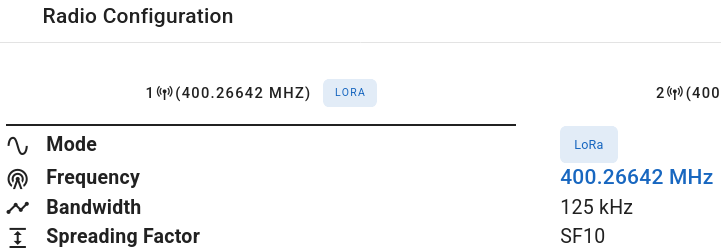
Try to use the TLE used and displayed at TinyGS for each satellite and do observations manually rather than scheduled ones in SatNOGS.
Bali, seeing that waterfall example with the faint horizontal lines makes total sense. I was looking for overly obvious traces, which explains a lot! And your point about TinyGS is well taken—definitely tempting to set one up.
dl7ndr, thanks for the crucial tip regarding outdated TLEs in SatNOGS for LoRa satellites and the specific ID for Electra. That is a huge time-saver and game-changer for my manual scheduling!
Thank you for all the great advice! Inspired by your suggestions, I just ran a quick test of the pipeline with rtl_sdr and lorarx on my setup (using an RTL-SDR Blog V4).
Everything hooked up smoothly and started reading samples as expected!
Now that I know the decoding chain is working properly, I’m ready to tackle actual satellite passes using proper TLEs and manual scheduling. Thanks again for pointing me in the right direction!