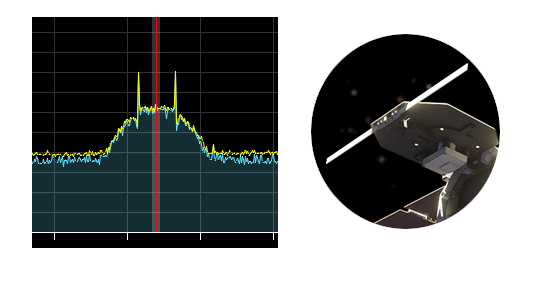
Is this horn intentional or just a coincidence? 

1 Like
Not sure about the sample rate, I guess it is the classic one we use for the rest of the IQ recordings coming from satnogs stations. @sdoukos @mpalou can you help me on this?
UHF: 400.550
S-band: 2208.000 (however the signal may be at 2208.100 due to a bug on the flowgraph for the high baudrates)
1 Like
sampling rates are
UHF: 200k
S-band: 1.6M
3 Likes
Good morning Scott,
Great to see you up and running trying to decode the frames, the challenge is indeed the CRC, there is no check available when using CCSDS Uncoded whit gr-satellites.
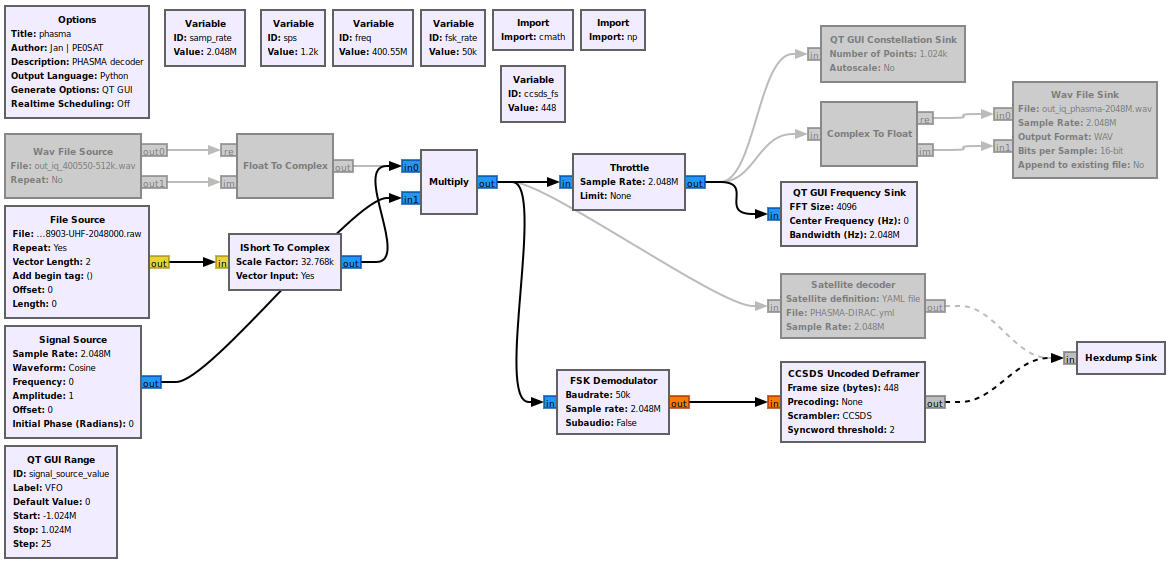
Here is the flow graph that I used, the raw file is the IQ output from a SatNOGS observation and can be replayed as seen in the below image. If you want to replay the wav, disable the File source and enable the Wav File source.
Jan | PE0SAT
3 Likes
What CRC did you use last week when we where testing the first IQ, and can you share it so I can add it the my flow-graph.
Jan | PE0SAT
2 Likes
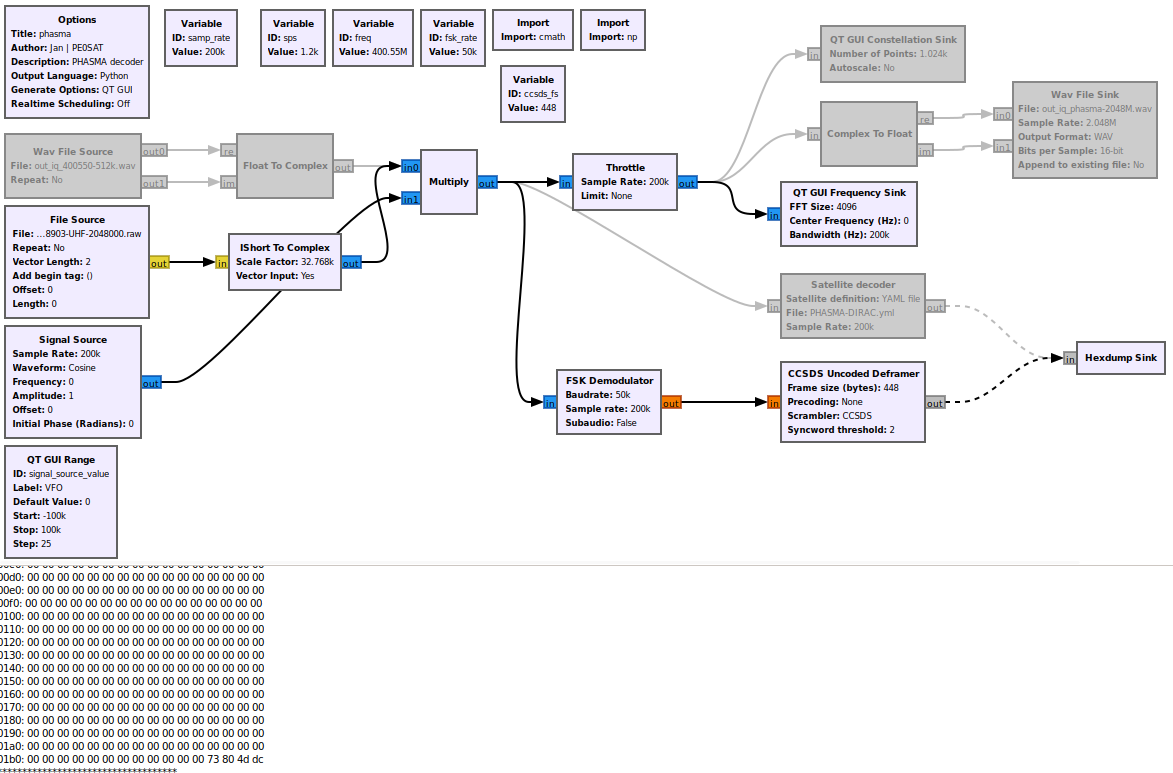
Replay iq_network-dev_38903-UHF-200000.raw, adding a CRC block to reduce noise detection.
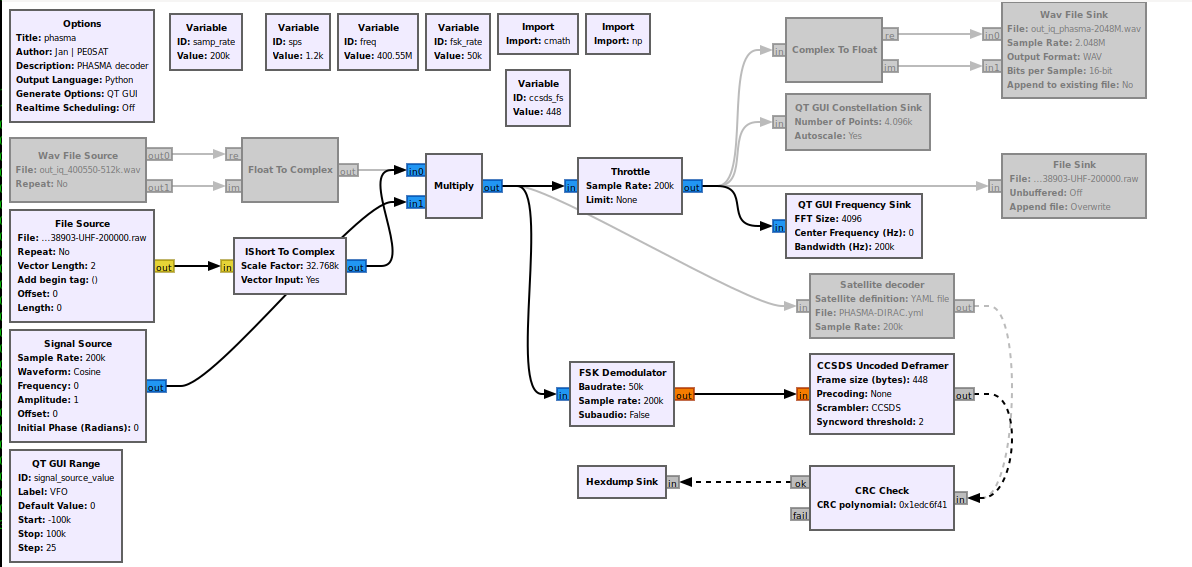
CRC polynomial: 0x1EDC6F41
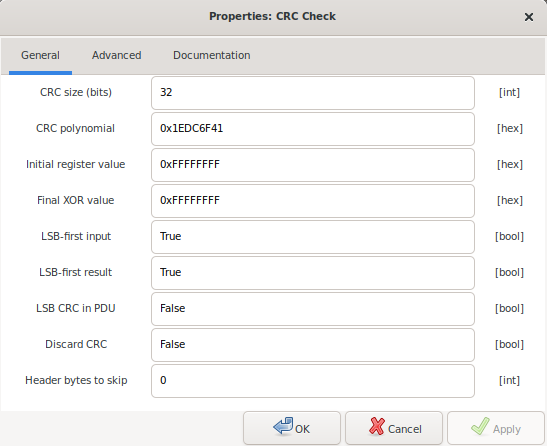
Producing:
***** VERBOSE PDU DEBUG PRINT ******
()
pdu length =        448 bytes
pdu vector contents =
0000: c4 46 90 00 00 6e 00 e0 00 68 c0 00 00 5f 00 00
0010: 00 00 05 19 ee 82 00 00 00 11 42 09 00 00 42 0b
0020: 80 00 42 06 80 00 00 06 d4 20 a0 00 05 1e ad 0d
0030: a1 9d e4 e2 ff 1f 21 bb e7 1e e3 4f 73 1f 91 b6
0040: 1e 1f cc 3f e5 20 28 e5 60 d9 c0 44 61 74 61 20
0050: 69 6e 20 42 41 43 4b 55 50 20 53 52 41 4d 20 69
0060: 73 20 6e 6f 74 20 76 61 6c 69 64 00 00 ba 40 0f
0070: f8 00 00 00 00 00 00 00 00 00 00 0f f8 00 00 00
0080: 00 84 68 00 00 00 00 00 00 00 00 00 00 00 00 00
0090: 00 00 00 00 00 00 00 00 00 00 00 00 00 00 00 00
00a0: 00 00 00 00 00 00 00 00 00 00 00 00 00 00 00 00
00b0: 00 00 00 00 00 00 00 00 00 00 00 00 00 00 00 00
00c0: 00 00 00 00 00 00 00 00 00 00 00 00 00 00 00 00
00d0: 00 00 00 00 00 00 00 00 00 00 00 00 00 00 00 00
00e0: 00 00 00 00 00 00 00 00 00 00 00 00 00 00 00 00
00f0: 00 00 00 00 00 00 00 00 00 00 00 00 00 00 00 00
0100: 00 00 00 00 00 00 00 00 00 00 00 00 00 00 00 00
0110: 00 00 00 00 00 00 00 00 00 00 00 00 00 00 00 00
0120: 00 00 00 00 00 00 00 00 00 00 00 00 00 00 00 00
0130: 00 00 00 00 00 00 00 00 00 00 00 00 00 00 00 00
0140: 00 00 00 00 00 00 00 00 00 00 00 00 00 00 00 00
0150: 00 00 00 00 00 00 00 00 00 00 00 00 00 00 00 00
0160: 00 00 00 00 00 00 00 00 00 00 00 00 00 00 00 00
0170: 00 00 00 00 00 00 00 00 00 00 00 00 00 00 00 00
0180: 00 00 00 00 00 00 00 00 00 00 00 00 00 00 00 00
0190: 00 00 00 00 00 00 00 00 00 00 00 00 00 00 00 00
01a0: 00 00 00 00 00 00 00 00 00 00 00 00 00 00 00 00
01b0: 00 00 00 00 00 00 00 00 00 00 00 00 69 66 a5 70
************************************
***** VERBOSE PDU DEBUG PRINT ******
()
pdu length =        448 bytes
pdu vector contents =
0000: c4 46 90 00 00 82 00 e0 00 6b c0 00 00 73 90 00
0010: 00 00 00 00 00 00 00 00 02 14 20 00 00 00 00 00
0020: 00 00 00 00 00 00 00 00 00 00 00 00 00 00 00 00
0030: 00 00 00 00 00 00 03 fe 00 00 00 00 00 00 00 00
0040: 00 00 03 fe 00 00 05 80 00 00 00 00 00 00 00 00
0050: 00 04 28 40 00 00 00 00 00 00 00 00 00 00 00 00
0060: 00 00 00 00 00 00 00 00 00 00 00 00 00 00 00 0f
0070: f8 00 00 00 00 00 00 00 00 00 00 0f f8 00 00 00
0080: 00 65 3c 00 00 00 00 00 00 00 00 00 00 00 00 00
0090: 00 00 00 00 00 00 00 00 00 00 00 00 00 00 00 00
00a0: 00 00 00 00 00 00 00 00 00 00 00 00 00 00 00 00
00b0: 00 00 00 00 00 00 00 00 00 00 00 00 00 00 00 00
00c0: 00 00 00 00 00 00 00 00 00 00 00 00 00 00 00 00
00d0: 00 00 00 00 00 00 00 00 00 00 00 00 00 00 00 00
00e0: 00 00 00 00 00 00 00 00 00 00 00 00 00 00 00 00
00f0: 00 00 00 00 00 00 00 00 00 00 00 00 00 00 00 00
0100: 00 00 00 00 00 00 00 00 00 00 00 00 00 00 00 00
0110: 00 00 00 00 00 00 00 00 00 00 00 00 00 00 00 00
0120: 00 00 00 00 00 00 00 00 00 00 00 00 00 00 00 00
0130: 00 00 00 00 00 00 00 00 00 00 00 00 00 00 00 00
0140: 00 00 00 00 00 00 00 00 00 00 00 00 00 00 00 00
0150: 00 00 00 00 00 00 00 00 00 00 00 00 00 00 00 00
0160: 00 00 00 00 00 00 00 00 00 00 00 00 00 00 00 00
0170: 00 00 00 00 00 00 00 00 00 00 00 00 00 00 00 00
0180: 00 00 00 00 00 00 00 00 00 00 00 00 00 00 00 00
0190: 00 00 00 00 00 00 00 00 00 00 00 00 00 00 00 00
01a0: 00 00 00 00 00 00 00 00 00 00 00 00 00 00 00 00
01b0: 00 00 00 00 00 00 00 00 00 00 00 00 48 ca 8f 20
************************************
Jan | PE0SAT
1 Like
Thanks for the reply, Jan!
You might have seen after my original post that I was directed to the 512k sample file on your site and that decoded just fine w/ the settings in your .YML file. So, it looks like we all have working setups now!
1 Like
Hi Scott,
There are now two extra SatNOGS IQ raw files on the URL shared.
iq_network-dev_38903-UHF-200000.raw
iq_network-dev_38947-SBand-1600000.raw
Jan | PE0SAT
2 Likes
Replacing this post where I asked about the format of the sample files; I was able to guess the parameters & converted with:
sox -r 200000 -c 2 -b 16 -e signed-integer iq_network-dev_38903-UHF-200000.raw -r 200000 -c 2 -b 32 -e floating-point iq_network-dev_38903-UHF-200000_cf32.raw
Thanks for posting the additional samples to test with!
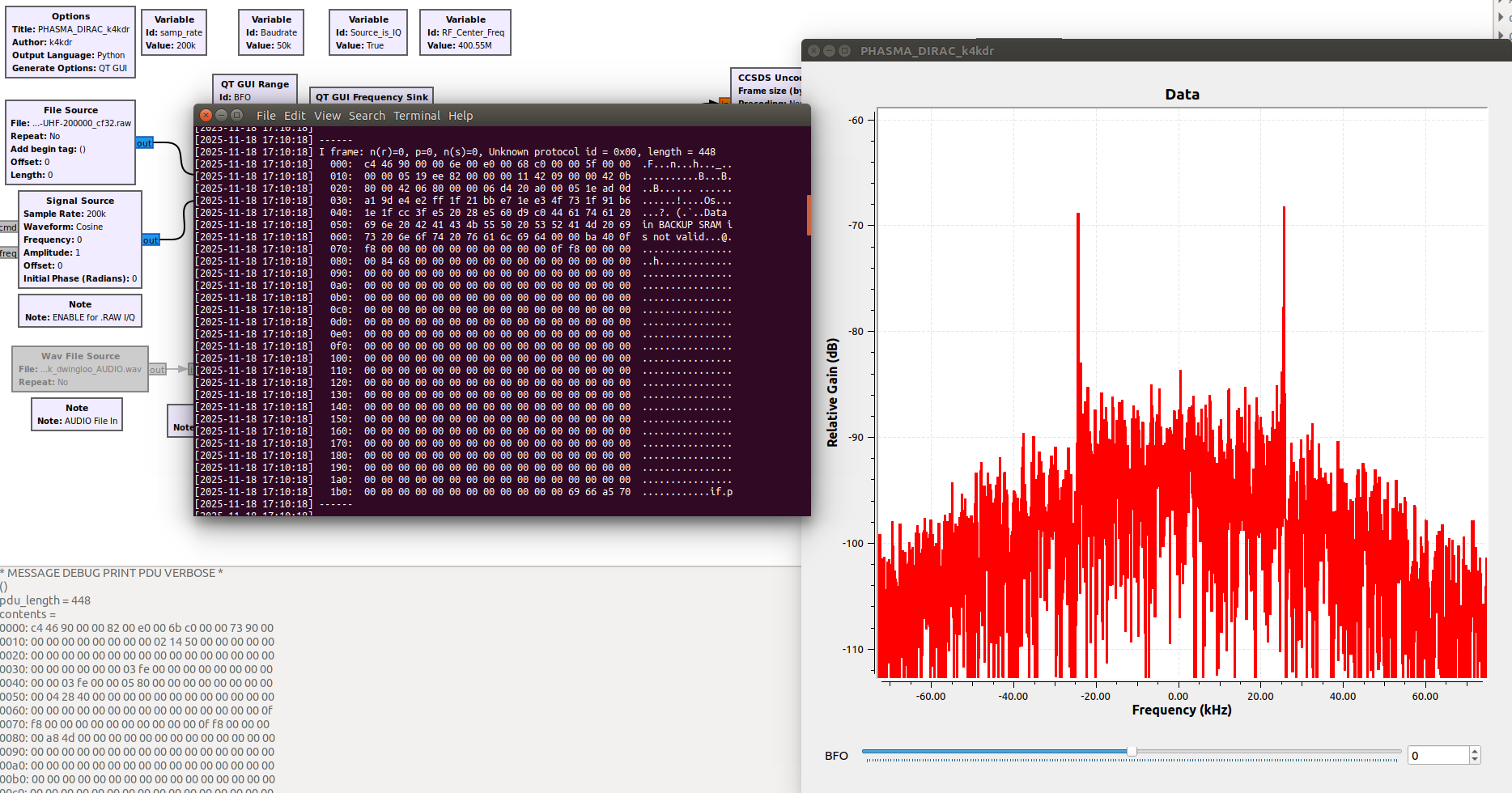
2 Likes
With the input sources re-ordered to my normal I/Q file on top, live audio from GQRX on the bottom… and with the addition of the CRC-check block, my new flowgraph is at
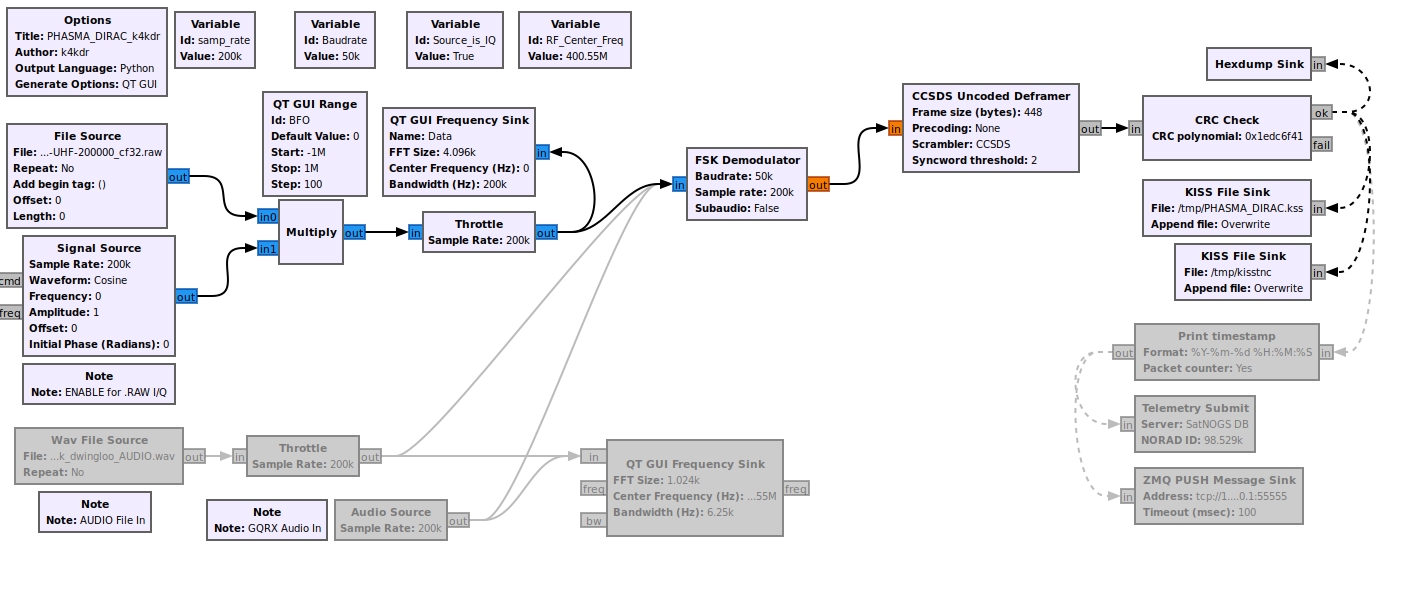
1 Like
Thanks Scott,
Below a script to convert SatNOGS IQ to GQRX IQ with just two cli options:
raw2gqrx.sh <file name> <sample rate>
#!/usr/bin/env bash
#
# Convert raw SatNOGS IQ to GQRX format

# Check dependencies:
DEPS=(sox)
SAMP="${2:-48000}"


for check in "${DEPS[@]}"
do
  if [ -z "$(command -v "${check}")" ]; then
    echo "# "
    echo "# dependency failure, install package ${check} and retry."
    exit 1
  fi
done

if [ -z "${1}" ];then
  echo "# "
  echo "# no input file or wrong extension, unable to convert, exiting."
  echo "# second commandline variable is optional to set alternative sps"
  exit 1
fi

echo "Converting ${1} to floating-point with ${SAMP} rate"

sox -t raw -b 16 -e signed-integer -r "${SAMP}" -c 2 "${1}" \
           -b 32 -e floating-point "${1%.raw}"_cf32.raw
Jan | PE0SAT
3 Likes
My final and updated phasma.grc is available at this URL also including some IQ files.
Jan | PE0SAT
3 Likes
With decoding of the UHF downlink sample files under control, would it be possible to get a little more information about how to decode the S-Band downlink?
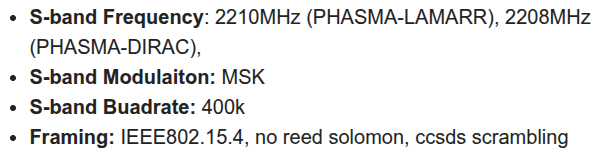
For example, the IEEE802.15.4 decoder has a significant number of parameters, does PHASMA use all the defaults?
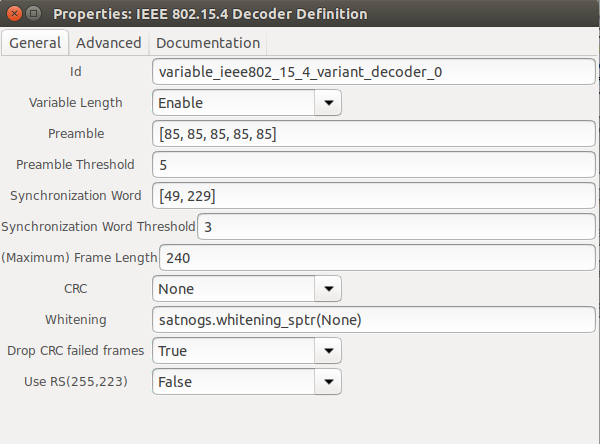
… ‘ccsds scrambling’ is also mentioned. Is that handled within the IEEE 802.15.4 decoder or do we need to add the ‘CCSDS descrambler’ block? Thanks!
1 Like
Hello
The options should be
Preamble: [0b01010101] * 12
Synchronization Word: [0x1A, 0xCF, 0xFC, 0x1D]
(Maximum) Frame Length: 448
CRC: CRC32_C
Whitening: mask=0xa9, seed=0xff, order=7, msb=True, self_sync=False
Those parameters are the same for both UHF and S-band. What i see that your 802.15.4 decoder definition block is from an older version of gr-satnogs and i am not sure if it works as expected. @mpalou should know better. Aside from that since you have an older gr-satnogs you also don’t have the flowgraph for PHASMA, but i don’t know exactly what is your setup.
Also another problem that i have identified with S-band decoding due to the high baudrate is that the Doppler Compensation block does not work as expected. Specifically for the removing of the lo_offset the input should be samp_rate / 2*874e3 >= 2. This is the case based on our specific flowgraphs.
So to work with the existing flowgraphs one should use lo_offset = 0 so the signal is already centered (with the DC also present). The other option is, if your SDR supports it, to use a sampling rate of at least 3.5e6 with lo_offset of around 500e3 so the Doppler Compensation block can works as expected.
I have some IQ recordings for S-band i will post them shortly so anyone could test.
3 Likes
That’s extremely helpful - thank you! And I have switched to a GRC 3.10 machine and just pulled in the latest SatNogs OOT module.
I’m only guessing at the flow, so thanks in advance for any sample flowgraphs or at least please share if the I/Q file should flow through a DEMOD block of some kind, or directly into the FRAME DECODER block?
1 Like
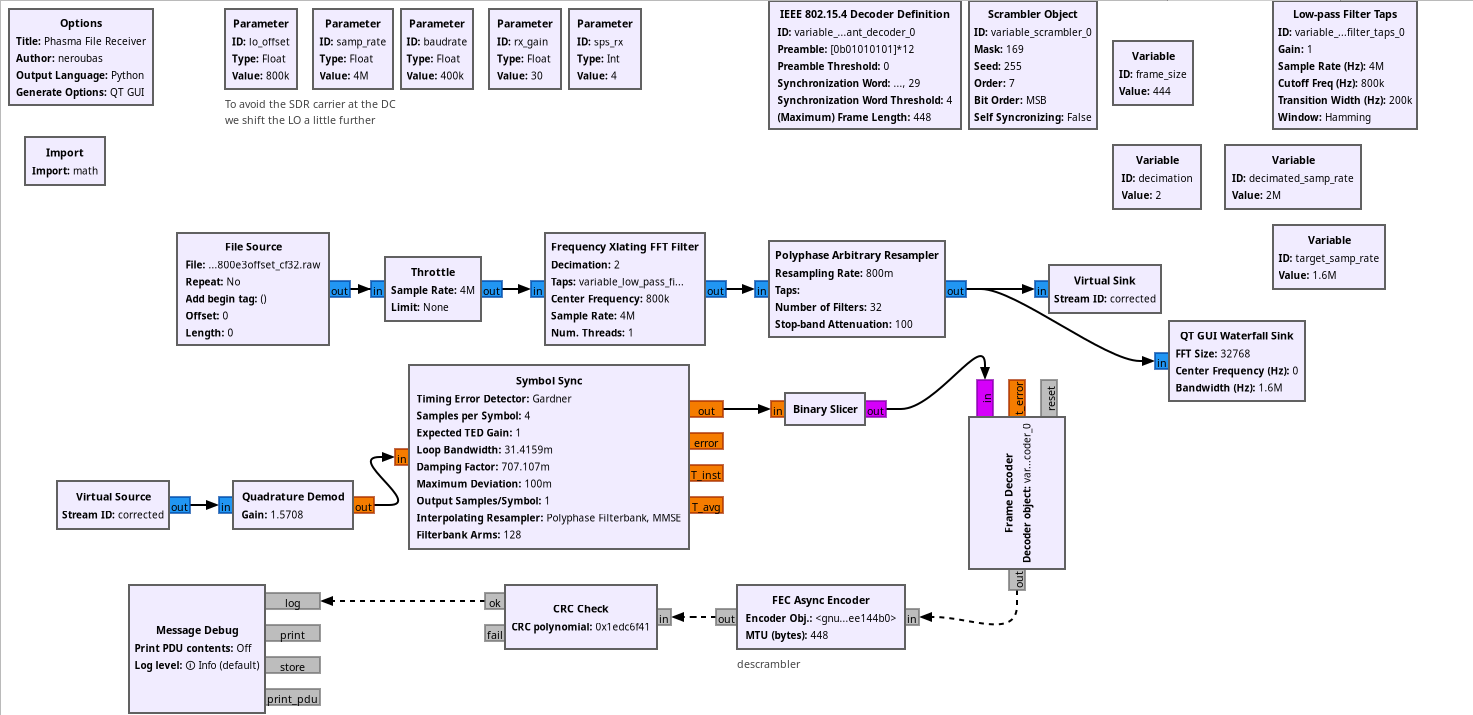
1 Like
Thank you for the sample flowgraphs! Can you please clarify if the S-Band downlink from the satellite will have that DC center spike, or is that only in the sample file because it was recorded using an SDR that has the spike?
And there was mention of some additional S-Band sample files. If those are available, they might be helpful for our testing.
Thanks!
This is the DC spike of the SDR.
I have some more sample files with different sampling rates and different lo_offsets if you need but the packages are the same. It is some periodic telemetry that the EQ model was sending during my capture without knowing any more details.
Anything would be helpful - thanks!
(Many people use Airspy products with no center spike)
1 Like