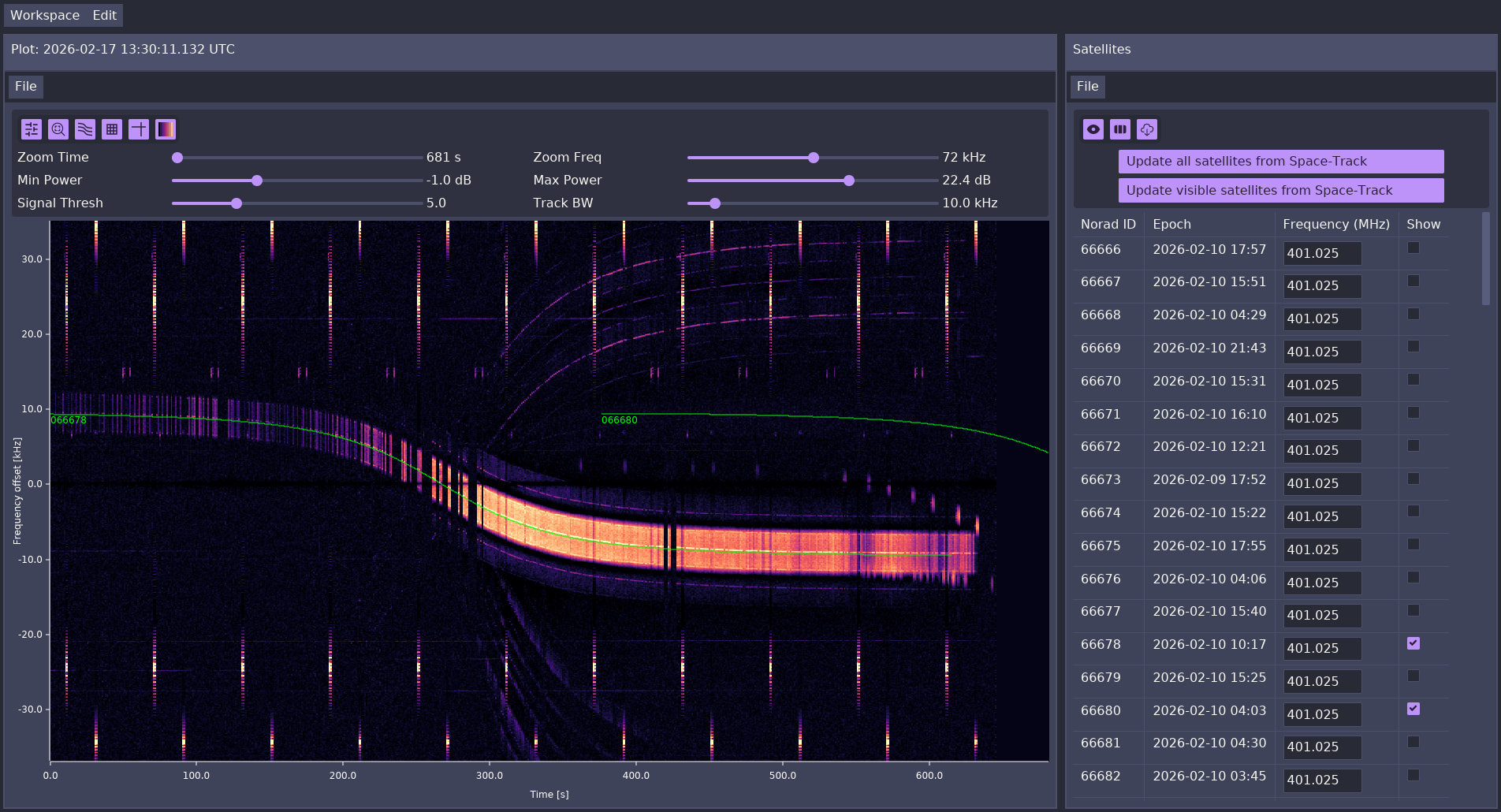
I tried adding a video here, but it seems to strain the server a bit much, so it’s on YouTube instead.
rSTRF started out as a pet project to try out Rust (sorry for the name), but it’s escalated into a full-blown GPU-accelerated waterfall renderer. In my slightly biased opinion, it feels much nicer to use than STRF’s pgplot. It features
panning and zooming with the mouse/mouse wheel
multiple plots side-by-side
GUI controls for the plot
GUI for selecting TLEs to predict
space-track.org integration
It’s still alpha software, but it’s now stable enough that it’s replaced rfplot for my day-to-day use, and I figured it might be interesting for some of you. If you would like to try it out, head over to Github. I would love to hear your feedback! There are instructions for building and basic usage in the README. If something is unclear, I’ll gladly help.
I use rSTRF on recordings of single satellite passes, ~10-15min in length. I know many STRF users use far longer recordings, and I’m not sure how well it will cope with that (since it loads the entire spectrogram into GPU memory). If it breaks, please let me know.
Allocating 2197.27 MB of memory
opened /import/obs/satobs/436/2026-02-19T00:00:01+00:00/2026-02-19T00:00:01_000000.bin
opened /import/obs/satobs/436/2026-02-19T00:00:01+00:00/2026-02-19T00:00:01_000001.bin
opened /import/obs/satobs/436/2026-02-19T00:00:01+00:00/2026-02-19T00:00:01_000002.bin
At the moment I am not actively working on your version of strf myself but I can provide some raw data if needed.
The fit_trace (f key in rfplot) function is implemented but it doesn’t write the output anywhere yet. That’s second on my to-do list (after IQ file import).
Let me start with saying thanks for your effort, I like the idea being able to do Pan Tilt Zoom in the loaded waterfall. My Ubuntu systems are not running on an GPU driven system, however, since I migrated my windows 10 to windows 11 system my RTX3080 did not fit my new system so I have an I7 generation 2014 and the RTX3080, 16 GB of onboard ram so it’s tempting to make that run some linux distro to test your work.
Is there a recommended Linux distribution? I have 22.04 LTS on the other strf systems which I access with VNC, but this one could have a moitor on my desk. Thanks for info,
So I did a little investigating. I assume this recording is from rffft running live, not on an IQ file? It seems like there’s two problems:
The time slices are quite inconsistent in length. rSTRF assumes all slices have the same length, and it checks that assumption when loading the spectrogram files. The max threshold was at a 10ms offset relative to what would be expected based on the start and length of the first slice. I’ve pushed a change to main that makes the parsing much more lenient (and much more technically incorrect), and now I can get past the loading stage.
The data is much larger than what I’ve been using. It seems like there’s a limit of 128MiB for the GPU buffer bind groups, so I can’t load all the files at once. If I only select 6 files, it works, but of course it’s not super useful then. You can open multiple plots side-by-side with 6 files each just fine though. I think there should be a way around this limitation (at least as long as there’s enough GPU memory), but it’s not an easy fix. I’ll take a look.
In addition to that, there’s a lot of aliasing artifacts when you’re zoomed out. This is caused by there being more channels than pixels on the screen (vertically). I have a solution in mind for this (basically mipmaps), but again not an easy fix.
I’m curious about the issues with loading TLE data though, could you share the files you were trying to load? I’ve also added some instructions to the README on how to collect debug logs, if you can share those that would be a great help.
It runs fine on my laptop (Ryzen 7 something with the integrated GPU), an RTX3080 should not be necessary. Given what I’ve discovered thanks to PE0SAT’s data, I don’t think the GPU will be a limiting factor at all, since the buffer size is limited to 128MB anyways.
Regarding the Linux distro: I develop & run it on NixOS. You should also be able to use the Nix package manager on any other distro (and then just nix run github:jazzpi/rstrf), but I’ve never tried that. I also set up a fresh Ubuntu 24.04 VM and made it run on there (see the README for build instructions).
In general there’s no arcane dependencies, so you can probably make it work on any distribution with not too much effort.
In regard to the data, yes you are right, all my rffft runs are live on 400 - 404, 434 - 438 and 22xx - 23xx MHz.
Example: airspy_rx -f 436 -b 0 -v 10 -m 5 -l 8 -a 6000000 -p 0 -r - | rffft -f 436e6 -s 6000000 -R 434000000,438000000 -c 50 -t 1 -q
The -c and -t have a big influence on the amount of data being stored.
-c <chansize>   Channel size [100Hz]
-t <tint>       Integration time [1s]
For every frequency range the run is recorded 24 hours and is producing 26G of data for the above example, on S-Band this is even 65G because of the higher sample rate.
In STRF the length of each integrated spectrum can be variable and this is specifically by design. The rffft code logs the timestamp at the start and end of each integration and uses those to determine the integration length. That, combined with the timestamp of the start of the integration is the information required to get accurate timestamps for frequency measurements using that integration.
With this approach, rffft is – again by design – resilient against packet loss, dropped samples or CPU hiccups. I specifically implemented STRF this way to allow recording of spectra over large bandwidths or on low performance CPUs and still get usable data. There have been occasions where I specifically ran rffft recordings with significant input data loss just to be able to record over large bandwidths.
Hence, for your project you should not use any assumption or constraint on the integration length to keep the operation similar to rfplot from STRF.
Glad you were able to replicate issues i had with loading a lot of data at once.
The TLE loading problem that was mentioned:
>> ./target/release/rstrf

[2026-02-19T20:14:18Z ERROR rstrf::panes::sat_manager] Failed to load satellites: Failed to parse TLE

Caused by:

TLE parse error: Parsing an integer field failed on TLE line 1 between characters 2 and 7
Happens when i try to load a catalog.tle from space-track.org
If i remove all tles except the first one it loads just fine.
Loading TLE files from celestrack does also work.