Changed to use the temporary NORAD ID in DB:
LUNA-1
1 98509C 25276P   25341.91661852 +.00013968 +00000+0 +67855-3 0 00100
2 98509  97.4485  53.7904 0002786 146.9258 213.2151 15.18557680001390
Changed to use the temporary NORAD ID in DB:
LUNA-1
1 98509C 25276P 25341.91661852 +.00013968 +00000+0 +67855-3 0 00100
2 98509 97.4485 53.7904 0002786 146.9258 213.2151 15.18557680001390
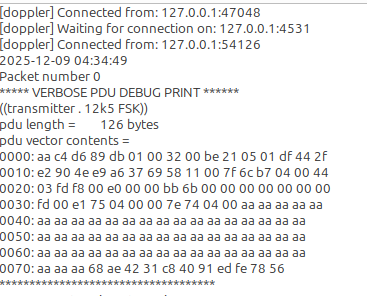
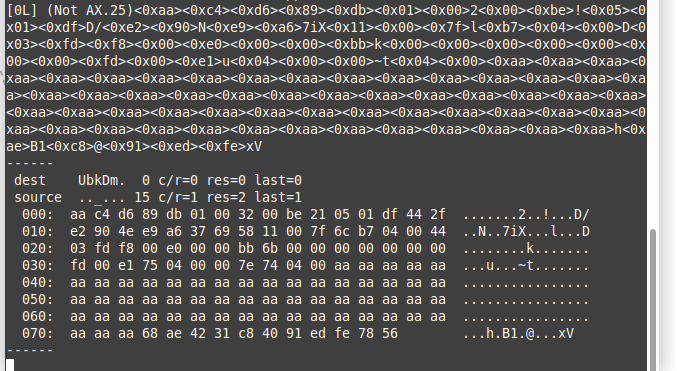
hi @PE0SAT, at least the first one is a valid packet.
you can use hunity_tlm to decode it. it expects the 126 bytes as uppercase hex string without whitespaces (with newline ‘\n’ at the end).
Thank you for directing us to the telem decode utility. I’ve tried using Jan’s HEX bytes as a string, as a TXT file, and as a binary HEX file without success. (the newline byte is included in every test)
Could you please give an example of how to provide those payload bytes to hunity_decode in the way it expects? Thank you!
Hi Jan and Friends,
Due to my error (beam tracking not enabled!), I only caught a few frames very late in an overhead Hunity pass (EM12jw). However, using your satyaml file for Hunity, I was able to obtain a credible single frame result in real time.
By using the team decoder with an IQ input, several more frames appeared
file with IQ –> link is here
Good hunting all,
Bob
There are several ways, a few examples for manual input:
printf “%s\n” “aa8078dfb601006800be210501df42ebcd2b789cb73669a903b134610191870100915b810001885104d136190101880109514959033188d900b123010069880100295b410281860101f9044101b908e107e113910d912701ff01ff01ff01ff01ff01ff01ff01ff01ff01ff01ff01ff01ffaaaa948a725bd767e97703e411” | tr ‘[:lower:]’ ‘[:upper:]’ | hunity_packets
echo “AA8078DFB601006800BE210501DF42EBCD2B789CB73669A903B134610191870100915B810001885104D136190101880109514959033188D900B123010069880100295B410281860101F9044101B908E107E113910D912701FF01FF01FF01FF01FF01FF01FF01FF01FF01FF01FF01FF01FFAAAA948A725BD767E97703E411” | hunity_packets
The telemetry decoder also accepts streamed input on stdin.
Good morning @szlldm and thanks for the update and explanation.
I used the first frame that was decoded with the help of gr-satellites and got the following output.
echo "aa30f0dab601006800be210501df428f8638177eb736699103813b890191870100515a0100c987590351494901c9874905413e5902b986a900011f210091870900515ac101f1860101f9044101b908e107e113910d912701ff01ff01ff01ff01ff01ff01ff01ff01ff01ff01ff01ff01ffaaaa10aa40f709ccda3aa9da79" | tr ‘[:lower:]’ ‘[:upper:]’ | hunity_packets
TELEMETRY-66 	from OBC-1
	Timestamp: 2025-12-08 11:33:18
	MPPT-WXm02 input current: 114 [mA]                     [1 seconds ago]
	MPPT-WXm02 input voltage: 1904 [mV]                    [1 seconds ago]
	MPPT-WXm02 output current: 49 [mA]                     [1 seconds ago]
	MPPT-WXm02 output voltage: 4338 [mV]                   [1 seconds ago]
	MPPT-WXm01 input current: 0 [mA]                       [1 seconds ago]
	MPPT-WXm01 input voltage: 2890 [mV]                    [1 seconds ago]
	MPPT-WXm01 output current: 0 [mA]                      [1 seconds ago]
	MPPT-WXm01 output voltage: 4345 [mV]                   [1 seconds ago]
	MPPT-WXp02 input current: 107 [mA]                     [1 seconds ago]
	MPPT-WXp02 input voltage: 2346 [mV]                    [1 seconds ago]
	MPPT-WXp02 output current: 41 [mA]                     [1 seconds ago]
	MPPT-WXp02 output voltage: 4345 [mV]                   [1 seconds ago]
	MPPT-WXp01 input current: 169 [mA]                     [1 seconds ago]
	MPPT-WXp01 input voltage: 1992 [mV]                    [1 seconds ago]
	MPPT-WXp01 output current: 75 [mA]                     [1 seconds ago]
	MPPT-WXp01 output voltage: 4311 [mV]                   [1 seconds ago]
	MPPT-Yp input current: 21 [mA]                         [1 seconds ago]
	MPPT-Yp input voltage: 992 [mV]                        [1 seconds ago]
	MPPT-Yp output current: 4 [mA]                         [1 seconds ago]
	MPPT-Yp output voltage: 4338 [mV]                      [1 seconds ago]
	MPPT-XpXm input current: 1 [mA]                        [1 seconds ago]
	MPPT-XpXm input voltage: 2890 [mV]                     [1 seconds ago]
	MPPT-XpXm output current: 56 [mA]                      [1 seconds ago]
	MPPT-XpXm output voltage: 4318 [mV]                    [1 seconds ago]
	MPPT-COM_Yp input current: 32 [mA]                     [1 seconds ago]
	MPPT-COM_Yp input voltage: 159 [mV]                    [1 seconds ago]
	MPPT-COM_Yp output current: 40 [mA]                    [1 seconds ago]
	MPPT-COM_Yp output voltage: 279 [mV]                   [1 seconds ago]
	MPPT-COM_Ym input current: 252 [mA]                    [1 seconds ago]
	MPPT-COM_Ym input voltage: 636 [mV]                    [1 seconds ago]
	MPPT-COM_Ym output current: 434 [mA]                   [1 seconds ago]
	MPPT-COM_Ym output voltage: 1266 [mV]                  [1 seconds ago]
	IR sensor-EXPXm: 65280                                 [1 seconds ago]
	IR sensor-EXPXp: 65280                                 [1 seconds ago]
	IR sensor-EXPYm: 65280                                 [1 seconds ago]
	IR sensor-EXPYp: 65280                                 [1 seconds ago]
	IR sensor-EXPZm: 65280                                 [1 seconds ago]
	IR sensor-WXmYm: 65280                                 [1 seconds ago]
	IR sensor-WXpYm: 65280                                 [1 seconds ago]
	IR sensor-Xm: 65280                                    [1 seconds ago]
	IR sensor-Xp: 65280                                    [1 seconds ago]
	IR sensor-Ym: 65280                                    [1 seconds ago]
	IR sensor-Yp: 65280                                    [1 seconds ago]
	IR sensor-Zm: 65280                                    [1 seconds ago]
	IR sensor-YpZpEdge: 65280                              [1 seconds ago]
Input end-of-line, exit...
Good luck with your mission.
Jan | PE0SAT
Thanks! Did not realize it was the ‘hunity_packets’ utility that I needed to use.
We have added a link to the current telemetry. It is updated every day.
https://gnd.bme.hu/tles/hunity_satnogs.tle
We will use it until celestrak lists it in the active elements.
Preliminary TLE for Foresail-1p (will be released nominally from ION SCV-021 at 09/12/2025 at 09:18:59 UTC)
Foresail-1p
1 99999U 25000XX 25343.38819229 .00004178 00000-0 34972-4 0 9990
2 99999 97.4424 55.2170 0003820 61.6496 14.5061 15.16321950 59107
Foresail-1p separation confirmed
Foresail-1p deployment beacon
Congratulations on the deployment!
Can you please confirm if the framing from Foresail-1P is the 9k6 AX100 indicated on SatNogs?
The only decodes that I get from the strongest packets in that Observation you posted are ‘CCSDS_Uncoded’. (but that could easily be false / trash decodes)
Thanks!
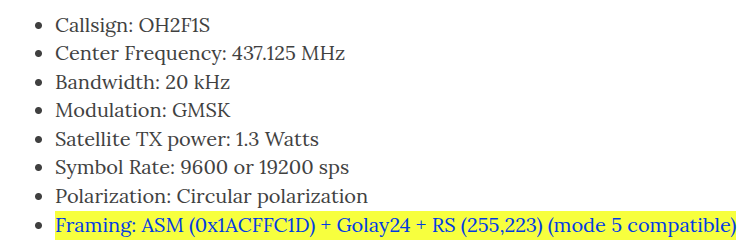
Sorry - I found the details on your website (https://foresail.github.io/):
how you use this information to decode the observation before? is it can decoded by gr-satellites? can you explain step by step? thank you
Someone will have to assist us with that… there is a ‘FORESAIL-1.yml’ file in gr-satellites, but I get an error when running it:
TypeError: init() got an unexpected keyword argument ‘syncword’
The pseudo random sequence generated using the polynomial h(x) = x8 + x7 + x5 + x3 + 1.
Ref: CCSDS 131.0-B-3, 10.4.1
This is used for data whitening
Sync word: 0x1ACFFC1D then Golay24 then the packet itself then RS (255, 223) data scrambled with that pseudo random sequence
Not sure if I understand right, which decoder do you mean?
Thanks I’ll take a look in the next hours to add it as a source, until then I’ll do it the manual way.
I’m not completely sure how the decoder part works in the satnogs client, but I haven’t seen a single decoded frame from any of the stations. That’s why I assume that there is either no decoder behind the transponder or the signals of the observations are just too weak to be demodulated and decoded. Or do i need to run gr-satellites on the recordings?
For users that have the gr-satellites integration enabled then they can use the below Yaml file and add it to the $PYTHONPATH/satellites/satyaml location.
cat HUNITY.yml
name: HUNITY
norad: 98537
telemetry_servers:
  - BMEWS
data:
  &tlm Telemetry:
    unknown
  &signalling Signalling:
    unknown
transmitters:
  1k25 FSK:
    frequency: 437.390e+6
    modulation: FSK
    baudrate: 1250
    deviation: 312.5
    framing: MRC-100 RA
    frame size: 126
    data:
    - *tlm
  2k5 FSK:
    frequency: 437.390e+6
    modulation: FSK
    baudrate: 2500
    deviation: 625
    framing: MRC-100 RA
    frame size: 126
    data:
    - *tlm
  5k FSK:
    frequency: 437.390e+6
    modulation: FSK
    baudrate: 5000
    deviation: 1250
    framing: MRC-100 RA
    frame size: 126
    data:
    - *tlm
  12k5 FSK:
    frequency: 437.390e+6
    modulation: FSK
    baudrate: 12500
    deviation: 3125
    framing: MRC-100 RA
    frame size: 126
    data:
    - *tlm
This file will need some updates when for example the NoradID is determined.
Jan | PE0SAT