Pure-Python LoRa decoder and TinyGS SDR ground station (no ESP32)

Hello Yukio,

Thanks for getting back, we had some refactoring after your comment that the repo was hard to navigate. Therefore we made it easier, more “plug and play”, checkout the README receive-from-an-sdr section and /examples/sdr_live.py script.

Make sure to update the softlora using pip to run the latest version.

Thank you for your help. And do not hesitate to let me know if you need further assistance.

Hamza

3 Likes

Hi Hamza,

Since 137 MHz ESP32 modules are hard to find, I’m very interested in your SDR method. If your script can be used to decode 137 MHz signals, I would love to try it out!

Any advice on using it for the 137 MHz band would be greatly appreciated.

Best regards, 73, Yukio / JP7DVX

Hello Yukio,

You can configure the FREQ_HZ=137e6 in /examples/sdr_live script and it will start working right away. Also do not forget to set other LoRa parameters like BW, SF and Preamble .

Let me if it works for you and show us your findings :slight_smile:

best regards,
Hamza

Hi Hamza,

Thank you for the update and guidance!

When I tried to follow your advice, my AI assistant unfortunately misunderstood the implementation and tried to manually hotfix the SoapySDR code, which caused unnecessary errors and confusion. We have now completely reverted the script back to its clean, original state to avoid any further mess.

Could you please provide step-by-step instructions or clarify how FREQ_HZ=137e6 and other parameters (BW, SF, Preamble) should be properly configured in the latest version? I want to make sure I’m following your intended setup correctly.

Thanks again for your patience and support!

Best regards, 73, Yukio / JP7DVX

Hi Yukio,

First you need to install SoapySDR because the softlora.sdr currently depends on it. To do so you can run (e.g., on Ubuntu/Debian):

sudo apt install soapysdr-tools python3-soapysdr
sudo apt install soapysdr-module-rtlsdr  # (or soapysdr-module-airspy / soapysdr-module-hackrf depending on your hardware)

Then create a virtual environment and install softlora

python3 -m venv --system-site-packages venv
source venv/bin/activate
pip install softlora

Now your enviroment is ready, you need to run the script. You can copy it to a python file or download it via curl -O https://gitlab.com/librecube/lib/python-softlora/-/raw/main/examples/sdr_live.py

When you open the file you will find this section:

FREQ_HZ = 436.13125e6    # what the transmitter is on
SF = 8                   # spreading factor
BW = 125e3               # bandwidth
PREAMBLE = 15            # preamble upchirps

You need to tune it to your transmitter by changing the value of each variable.

If you are not using a rtl sdr, you can choose your sdr in the radio section
RADIO = 'rtlsdr' # 'rtlsdr', 'airspy' or 'hackrf'

Finally run the script python sdr_live.py

Please let me know if you need any further assistance, and feel free to share your findings.

best,
Hamza

1 Like

Hi Hamza,

Thank you for the detailed steps! I followed your instructions:

  1. Installed the SoapySDR packages and soapysdr-module-rtlsdr.

  2. Created a virtual environment with --system-site-packages, installed softlora, and downloaded sdr_live.py.

  3. Updated FREQ_HZ = 137e6 in the script.

However, when running python sdr_live.py, the RTL-SDR Blog V4 is detected by the system, but softlora encounters a SoapySDR device matching error. Here is the exact terminal output:

Plaintext

Detached kernel driver
Found Rafael Micro R828D tuner
RTL-SDR Blog V4 Detected
Reattached kernel driver
Traceback (most recent call last):
  File "/home/yukio/venv/lib/python3.13/site-packages/softlora/sdr.py", line 384, in _open
    radio = SoapySDR.Device(args)
  File "/usr/lib/python3/dist-packages/SoapySDR.py", line 1833, in __new__
    return cls.make(*args, **kwargs)
  File "/usr/lib/python3/dist-packages/SoapySDR.py", line 1459, in make
    return _SoapySDR.Device_make(*args)
RuntimeError: SoapySDR::Device::make() no match

The above exception was the direct cause of the following exception:

  ...

RuntimeError: no SDR matched {'driver': 'rtlsdr'} (plugged in: rtlsdr)

It seems like softlora is trying to open the device with {'driver': 'rtlsdr', but SoapySDR on my Debian environment fails to match it. Do you have any suggestions on how to resolve or bypass this SoapySDR initialization error?

Thanks again for your time and help!

Best regards, 73, Yukio / JP7DVX

Hello Yukio,

It seems like its failing at the soapy sdr not the softlora. Can you run

SoapySDRUtil --info
SoapySDRUtil --find="driver=rtlsdr"
SoapySDRUtil --probe="driver=rtlsdr"

or using python

import SoapySDR
print(SoapySDR.Device.enumerate())
d = SoapySDR.Device({'driver': 'rtlsdr'})
print(d.getHardwareKey())

Please provide me with logs if that fails

best,
Hamza

1 Like

Hi Hamza,

Thank you for the instructions. I ran the diagnostic Python snippet you provided.

SoapySDR.Device.enumerate() successfully detected the device, but calling SoapySDR.Device({'driver': 'rtlsdr'}) directly threw a no match runtime error. Here is the exact terminal output:

Plaintext

>>> import SoapySDR; print(SoapySDR.Device.enumerate()); d = SoapySDR.Device({'driver': 'rtlsdr'}); print(d.getHardwareKey())
[INFO] [UHD] linux; GNU C++ version 14.2.0; Boost_108300; UHD_4.8.0.0+ds1-2
ALSA lib control.c:1575:(snd_ctl_open_noupdate) Invalid CTL pulse
Detached kernel driver
ALSA lib control.c:1575:(snd_ctl_open_noupdate) Invalid CTL pulse

RtApi::getDeviceInfo: deviceId argument not found.

Found Rafael Micro R828D tuner
RTL-SDR Blog V4 Detected
Reattached kernel driver
(<SoapySDR.SoapySDRKwargs; proxy of <Swig Object of type 'std::map< std::string,std::string > *' at 0x7fea6f360930> >,)
Traceback (most recent call last):
  File "<string>", line 1, in <module>
    import SoapySDR; print(SoapySDR.Device.enumerate()); d = SoapySDR.Device({'driver': 'rtlsdr'}); print(d.getHardwareKey())
                                                         ~~~~~~~~~~~~~~~~~~~~~~~~~~~~~~~~~~~~~~~~^^^^^^^^^^^^^^^^^^^^^^^^^^
  File "/usr/lib/python3/dist-packages/SoapySDR.py", line 1833, in __new__
    return cls.make(*args, **kwargs)
           ~~~~~~~~^^^^^^^^^^^^^^^^^
  File "/usr/lib/python3/dist-packages/SoapySDR.py", line 1459, in make
    return _SoapySDR.Device_make(*args)
           ~~~~~~~~~~~~~~~~~~~~~^^^^^^^
RuntimeError: SoapySDR::Device::make() no match

It seems that while enumeration works fine, the Python binding fails to initialize the device with {'driver': 'rtlsdr'} on my environment. Do you know why this specific Device_make() call is failing?

Thanks again for your guidance!

Best regards, 73, Yukio / JP7DVX

Does rtl_test work?

1 Like

Hi taylorwass,

Thank you for checking! I ran rtl_test, and it successfully detected the device, though it reported some buffer drops:

Plaintext

Found 1 device(s):
  0:  RTLSDRBlog, Blog V4, SN: 00000001

Using device 0: Generic RTL2832U OEM
Detached kernel driver
Found Rafael Micro R828D tuner
RTL-SDR Blog V4 Detected
Supported gain values (29): 0.0 0.9 ... 49.6 
Sampling at 2048000 S/s.

Reading samples in async mode...
Allocating 15 zero-copy buffers
lost at least 1029021 bytes
lost at least 1028497 bytes

So the hardware and basic rtl-sdr tools are working, but the python SoapySDR.Device({'driver': 'rtlsdr'}) call is still failing with no match. Do you have any ideas on how to fix this SoapySDR Python binding issue?

Best regards, 73, Yukio / JP7DVX

Could you please post:

SoapySDRUtil --info

This happened to me a while back. Can’t remember exactly but it’s a backend library version issue I believe. Post your operating system, the result of that command and how you installed Soapy/rtlsdr/SoapyRTLSDR

2 Likes

Hi taylorwass,

Thank you for sharing your experience! Here are the details you requested:

1. Operating System: Debian 13 (amd64), Linux kernel 6.12.107+deb13-amd64

2. Installation Method: Installed via APT packages on Debian:

Bash

sudo apt install soapysdr-tools python3-soapysdr soapysdr-module-rtlsdr

3. SoapySDRUtil --info Output:

Plaintext

######################################################
##      Soapy SDR -- the SDR abstraction library      ##
######################################################

Lib Version: v0.8.1-5+b2
API Version: v0.8.0
ABI Version: v0.8
Install root: /usr
Search path:  /usr/lib/x86_64-linux-gnu/SoapySDR/modules0.8
Search path:  /usr/local/lib/x86_64-linux-gnu/SoapySDR/modules0.8         (missing)
Search path:  /usr/local/lib/SoapySDR/modules0.8                         (missing)
Module found: /usr/lib/x86_64-linux-gnu/SoapySDR/modules0.8/libHackRFSupport.so  (0.3.4)
Module found: /usr/lib/x86_64-linux-gnu/SoapySDR/modules0.8/libLMS7Support.so    (23.11.0)
Module found: /usr/lib/x86_64-linux-gnu/SoapySDR/modules0.8/libRedPitaya.so      (0.1.1)
Module found: /usr/lib/x86_64-linux-gnu/SoapySDR/modules0.8/libairspySupport.so  (0.2.0)
Module found: /usr/lib/x86_64-linux-gnu/SoapySDR/modules0.8/libaudioSupport.so   (0.1.1)
Module found: /usr/lib/x86_64-linux-gnu/SoapySDR/modules0.8/libbladeRFSupport.so (0.4.2)
Module found: /usr/lib/x86_64-linux-gnu/SoapySDR/modules0.8/libmiriSupport.so    (0.2.5)
Module found: /usr/lib/x86_64-linux-gnu/SoapySDR/modules0.8/libosmosdrSupport.so (0.2.5)
Module found: /usr/lib/x86_64-linux-gnu/SoapySDR/modules0.8/libremoteSupport.so  (0.5.2)
Module found: /usr/lib/x86_64-linux-gnu/SoapySDR/modules0.8/librfspaceSupport.so (0.2.5)
Module found: /usr/lib/x86_64-linux-gnu/SoapySDR/modules0.8/librtlsdrSupport.so  (0.3.3)
Module found: /usr/lib/x86_64-linux-gnu/SoapySDR/modules0.8/libuhdSupport.so      (0.4.1)
Available factories... airspy, audio, bladerf, hackrf, lime, miri, osmosdr, redpitaya, remote, rfspace, rtlsdr, uhd
Available converters...
 -  CF32 -> [CF32, CS16, CS8, CU16, CU8]
 -  CS16 -> [CF32, CS16, CS8, CU16, CU8]
 -  CS32 -> [CS32]
 -   CS8 -> [CF32, CS16, CS8, CU16, CU8]
 -  CU16 -> [CF32, CS16, CS8]
 -   CU8 -> [CF32, CS16, CS8]
 -   F32 -> [F32, S16, S8, U16, U8]
 -   S16 -> [F32, S16, S8, U16, U8]
 -   S32 -> [S32]
 -    S8 -> [F32, S16, S8, U16, U8]
 -   U16 -> [F32, S16, S8]
 -    U8 -> [F32, S16, S8]
######################################################
##      Soapy SDR -- the SDR abstraction library      ##
######################################################

Do you remember how you resolved the version issue when you encountered it? Any advice would be greatly appreciated!

Best regards, 73, Yukio / JP7DVX

1 Like

Hello - I have tested this in a virtual machine and could replicate the problem. Something broke behind the scenes with how the device arguments are passed to Soapy under some circumstances. When I fixed it a while back I just kept going back versions until everything worked.

I think you will observe that SoapySDRUtil --probe is broken too. Not sure why the audio device doesn’t enumerate but that can be removed by deleting the respective module (or running as root). That won’t affect what we are doing here.

The issue has been patched in SoapySDR source code as of Jan 2026 but has not made it to debian’s package manager yet, so we will have to uninstall the Soapy from the package manager and install the latest from the git.

There are some better ways to do this (such as making your own .deb file) which will allow you to update the software without breaking it in future (any updates won’t work until the patch is included in the debian apt metadata). Or you can have 2 installations and point your venv at the right one. Let me know if you have any issues and I can post the other ways. Just wanted to give you an immediate solution :slight_smile:

sudo apt-get purge -y \
  soapysdr-tools \
  python3-soapysdr \
  'soapysdr-module-*' \
  'libsoapysdr*'

sudo apt-get autoremove --purge -y

sudo apt update
sudo apt install -y \
    git \
    cmake \
    build-essential \
    swig \
    python3-dev \
    python3-numpy \
    librtlsdr-dev \
    rtl-sdr
############ Compile and install latest SoapySDR from the git.
cd /tmp
rm -rf SoapySDR

git clone https://github.com/pothosware/SoapySDR.git
cd SoapySDR

mkdir build
cd build

cmake \
  -DCMAKE_BUILD_TYPE=Release \
  -DCMAKE_INSTALL_PREFIX=/usr/local \
  ..

make -j"$(nproc)"
sudo make install
sudo ldconfig

########### Compile and install latest SoapyRTLSDR plugin from the git (this will make it against the working version of SoapySDR)

cd /tmp
rm -rf SoapyRTLSDR

git clone https://github.com/pothosware/SoapyRTLSDR.git
cd SoapyRTLSDR

mkdir build
cd build

cmake \
  -DCMAKE_BUILD_TYPE=Release \
  -DCMAKE_PREFIX_PATH=/usr/local \
  -DCMAKE_INSTALL_PREFIX=/usr/local \
  ..

make -j"$(nproc)"
sudo make install
sudo ldconfig

# This installs it to: /usr/local/bin/SoapySDRUtil

##############
# To test it worked run: 
SoapySDRUtil --info
SoapySDRUtil --probe

# It should now say:
#Lib Version: v0.8.1-g1551ea0d
#Install root: /usr/local

# Then I think you need to rebuild your venv. Just delete the folder you made it in and create another one in a fresh folder (just start from the command that creates it that you posted, not the apt commands).


1 Like

Hi Hamza and taylorwass,

Great news! Following taylorwass’s detailed instructions, I purged the old APT packages of SoapySDR, built both SoapySDR and the SoapyRTLSDR plugin from the latest source code on GitHub, and recreated my Python virtual environment.

I ran the diagnostic Python snippet again, and it successfully initialized the device without any errors!

Plaintext

>>> import SoapySDR; print(SoapySDR.Device.enumerate()); d = SoapySDR.Device({'driver': 'rtlsdr'}); print(d.getHardwareKey())
({driver=rtlsdr, label=Generic RTL2832U OEM :: 00000001, manufacturer=RTLSDRBlog, product=Blog V4, serial=00000001, tuner=Rafael Micro R828D},)
[INFO] Opening Generic RTL2832U OEM :: 00000001...
R828D

The no match runtime error is completely gone, and my RTL-SDR Blog V4 is now fully working with Python.

Thank you both so much for your tremendous help, guidance, and patience in debugging this issue. I’m ready to move forward with the project now!

Best regards, 73, Yukio / JP7DVX

2 Likes

Hi Hamza and taylorwass,

Thanks to your great help, I’m finally able to run everything successfully up to this point!

Could you please teach me how to configure the settings for receiving 137 MHz signals? Any instructions, example commands, or configuration tips for the 137 MHz band would be greatly appreciated.

Thanks again!

Best regards, 73, Yukio / JP7DVX

Hello Yukio,

Thanks to Taylor the SoapySDR can initialize your SDR. Now you only need to follow my previous message starting from creating a virtual environment.

let me know if it works out for you or if you need further assistance.

best,
Hamza

1 Like

Hi Hamza and taylorwass,

Great news! Following Hamza’s instructions, I downloaded sdr_live.py, configured it for the 137 MHz band with RADIO = 'rtlsdr', and successfully got it running.

Furthermore, I set it up as a systemd service (softlora.service) so it can run automatically in the background as a 24/7 ground station. After resolving a brief USB interface conflict by adjusting the service restart parameters, it is now running completely stable!

Plaintext

● softlora.service - SoftLoRa Live SDR Receiver (137MHz)
     Loaded: loaded (/etc/systemd/system/softlora.service; enabled)
     Active: active (running) since Wed 2026-09-30 07:50:47 JST; active

Thank you both so much for your incredible help, step-by-step guidance, and patience throughout this journey. My RTL-SDR Blog V4 setup is now fully operational!

Best regards, 73, Yukio / JP7DVX

2 Likes

Hi everyone,

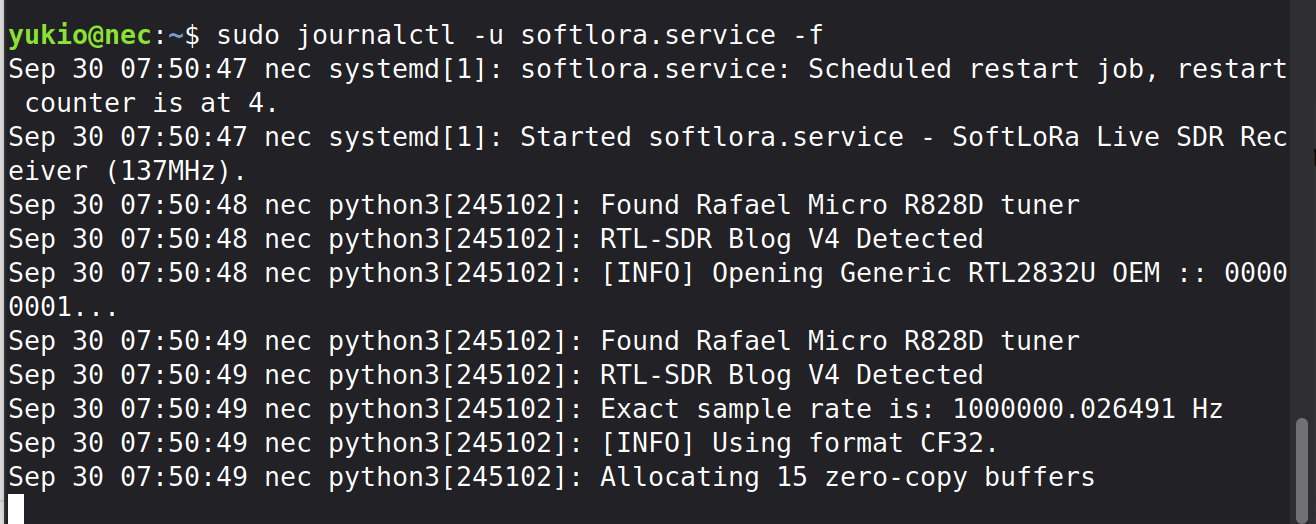
Thanks to everyone’s help, I have successfully got softlora running as a systemd service with my RTL-SDR Blog V4 on Debian 13 for 137 MHz reception. The service starts correctly and reaches the standby state (Allocating 15 zero-copy buffers) without any errors, as shown below:

Plaintext

Sep 30 07:50:49 nec python3[245102]: Found Rafael Micro R828D tuner
Sep 30 07:50:49 nec python3[245102]: RTL-SDR Blog V4 Detected
Sep 30 07:50:49 nec python3[245102]: Exact sample rate is: 1000000.026491 Hz
Sep 30 07:50:49 nec python3[245102]: [INFO] Using format CF32.
Sep 30 07:50:49 nec python3[245102]: Allocating 15 zero-copy buffers

However, after running for over 4 hours, the log remains completely static with no new entries or packets decoded. Is this normal when waiting for signals, or is there something I should check regarding my configuration or signal reception?

Any advice would be greatly appreciated. Thanks!

Best regards, 73, Yukio / JP7DVX

Hello Yukio,

Can you tell me your setup ? I know you are using a RTL SDR on your Debian machine; What antenna are you using, do you use any LNA ? Also do you expect a satellite pass or specific LoRa signal on 137 MHz ?

How stations are around in space @ 2m lora? I could only see 6 listed on tinygs. Apart from that, noone terrestial will be using lora on 137MHz (though it seems fine in theory !)